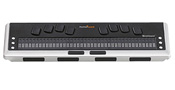
 This Week's Featured Advertisement: One Refurbished Brailliant BI 40 Cell Refreshable Braille Display for $2,100.00 USD !!!

Top Tech Tidbits for Thursday, June 12, 2014 - Volume 461
The Week's News in Access Technology
A Flying Blind, LLC Publication
http://www.flying-blind.com/
This Week's Featured Advertisement: One Refurbished Brailliant BI 40 Cell Refreshable Braille Display for $2,100.00 USD !!!
We're back with another refurbished, top-of-the-line, wireless Braille display at a tremendous savings! This gently used new generation of Brailliant Refreshable Braille displays gives you desktop USB/Bluetooth access in a form factor conducive to use with your favorite portable tablet and/or smartphone. Ergonomic thumbkeys together with Braille input keys make entering Braille text and navigating through the most complex Apps a snap for Windows, iOS, and Android users. The Brailliant BI line of displays are Flying Blind, LLC's preferred and most-used desktop Braille displays in a variety of educational, vocational, and communal settings. This unit ships with close to one year remaining on its manufacturer's warranty and is listed here at over 30% off of its suggested retail price, giving you a nearly $1,000.00 USD savings! We'll even throw in an additional Brailliant carrying case, valued at $90.00 USD, to anyone wishing to add a splash of style and class to their Brailliant!!! Price includes shipping within the 48 Continental United States. This unit will be sold on a first come, first serve basis. To be the first to secure this unit please use the Buy Now link included below. For more information, or to order this product offline, email featured@flying-blind.com or call +1 (216) 381-8107 today.
Buy Now - One Refurbished Brailliant BI 40 Cell Refreshable Braille Display for $2,100.00 USD - Flying Blind, LLC Online Store
Greetings,
Since it isn't a very busy news week we'll catch up on some new and updated articles from Gizmo first:
1A) Probably the Best Free Security List in the World:
http://www.techsupportalert.com/content/probably-best-free-security-list-world.htm
1B) How To Avoid Spam:
http://www.techsupportalert.com/content/how-avoid-getting-spammed.htm
1C) How to Protect Your Online Privacy:
http://www.techsupportalert.com/content/how-protect-your-online-privacy.htm
1D) How to Stay Safe While Online:
http://www.techsupportalert.com/content/how-stay-safe-while-online.htm
1E) How to Know If Your Computer Is Infected:
http://www.techsupportalert.com/content/how-know-if-your-computer-infected.htm
1F) How to Tell if a File is Malicious:
http://www.techsupportalert.com/content/how-tell-if-file-malicious.htm
1G) How to Tell If A Website Is Dangerous:
http://www.techsupportalert.com/content/how-tell-if-website-dangerous.htm
1H) How to Deal with the Ransomware Called CryptoLocker
http://feedproxy.google.com/~r/GizmosTechTips/~3/hwd-9D7wK_w/how-deal-ransomware-called-cryptolocker.htm
2) Learn some lesser-known techniques for navigating Microsoft Office with JAWS, other new JAWS tips, and some information about goings-on at Freedom Scientific on Tek Talk on GMT Tuesday, 17 June at 00:00:
http://conference321.com/masteradmin/room.asp?id=rsc9613dc89eb2
3) The Kindle Android App Gets Audible Integration That Provides an Option To Easily Switch Between Reading And Listening:
http://www.androidpolice.com/2014/06/10/kindle-android-app-gets-audible-integration-provides-option-easily-switch-reading-listening/
4) Thanks to iMore, we learn "How to set up, back up, restore, and update your iPhone or iPad using iCloud":
http://www.imore.com/how-to-setup-iphone-ipad-icloud
5) Ai Squared is pleased to announce a free ZoomText Mac update (1.1.2) which includes improvements for mouse tracking, the focus enhancement, and several bugs fixes including support for QuickBooks!
http://www.aisquared.com/news/more/zoomtext_mac_112_released?utm_content=buffer30268&utm_medium=social&utm_source=twitter.com&utm_campaign=buffer
The June 2014 issue of the Braille Monitor contains several opinion pieces related to adaptive technology:
6A) When Just Listening Is Not Enough: Google Falls Short On Accessibility for the Blind:
https://nfb.org/images/nfb/publications/bm/bm14/bm1406/bm140603.htm
6B) What Will It Take for Google to Find Its Voice:
https://nfb.org/images/nfb/publications/bm/bm14/bm1406/bm140604.htm
6C) Knowing What Is Good About the iPhone and What Is Not:
https://nfb.org/images/nfb/publications/bm/bm14/bm1406/bm140608.htm
6D) And Comparing the Windows Computer with the Mac:
https://nfb.org/images/nfb/publications/bm/bm14/bm1406/bm140612.htm
7) This page contains an Alphabetical Listing of All Commercial DVDs With Audio Description, a table with 389 movies:
http://www.acb.org/adp/dvdsalpha.html?utm_content=buffere4a6d&utm_medium=social&utm_source=twitter.com&utm_campaign=buffer
8) This article is entitled, "Using Braille with iOS, What's it Like?":
http://atmac.org/using-braille-with-ios-whats-it-like?utm_content=buffer92711&utm_medium=social&utm_source=twitter.com&utm_campaign=buffer
9) This post is labeled a diary of Do's and Don'ts in NVDA tickets, add-ons and what not:
http://joslee22590.blogspot.com/2014/06/nvdasr-diary-of-dos-and-donts-in-nvda.html?spref=tw
10) Sticking with NVDA, the NVDA Add-on Development Guide is now ready for study and application:
https://bitbucket.org/nvdaaddonteam/devguide
11) BGT, Blastbay Game Toolkit, is a free toolkit which allows you to produce your own audio games from the ground up, without having any prior knowledge of computer programming at all:
http://www.blastbay.com/bgt.php
12) Some low-cost tutorials and related downloads are to be found on the Pro Tools with Speech Page:
http://protoolswithspeech.com/
Turning to audio:
13A) Learn about OrCam Vision System in Episode 1424 of Eyes on Success:
http://www.eyesonsuccess.net/
13B) BlindPodcaster explains Switching voices on any Android device:
http://blindpodcaster.com/tech-bits-switching-voices-on-any-android-device/
13C) Talking Apps Episode 5 discusses WWDC 2014 and Third-Party Keyboards in iOS 8:
http://www.appcessible.net/talking-apps-episode-5-wwdc-2014-and-third-party-keyboards-in-ios-8/
13D) An AppleVis Quick Tip: Record Your Voice and System Sounds in Audio Hijack Pro With the Help of the LineIn Application:
http://applevis.com/podcast/episodes/quick-tip-record-your-voice-and-system-sounds-audio-hijack-pro-help-linein
And finally, from Serotalk come:
13E) SeroSpectives: This Month in Tech for May 2014:
http://serotalk.com/2014/06/06/serospectives-this-month-in-tech-for-may-2014/
13F) And Triple Click Home, Episode 30:
http://tripleclickhome.com/2014/06/11/triple-click-home-episode-30-the-secret-slide/
SUBSCRIBE: Do you, a friend, or colleague wish to receive Flying Blind, LLC Publications? If so, please use or pass along our CAPTCHA-free sign-up link, which is: https://toptechtidbits.com/subscribe. You can also subscribe to Flying Blind, LLC Publications on the Flying Blind, LLC Website at: http://www.flying-blind.com. Either of these methods will provide you with an accessibly friendly and secure medium through which you can subscribe to our mailing list. Just enter your name and email address, click send, and begin receiving Flying Blind, LLC Publications. It's that easy.
FACEBOOK: Are you on Facebook? Stop by and "Like" Flying Blind, LLC to begin receiving Top Tech Tidbits for Thursday as part of your Facebook News Feed: http://www.facebook.com/flyingblindllc.
YOUTUBE: If audio / video is more your style, then you can follow Flying Blind, LLC on YouTube at: http://www.youtube.com/flyingblindllc.
RSS FEED: If you prefer an RSS Feed, you can access Flying Blind, LLC Publications as they become available using: https://www.toptechtidbits.com/rss.xml.
ONLINE STORE: Shopping for accessible technology? Check out the Flying Blind, LLC Online Store at: https://www.toptechtidbits.com/store.html. All products offered in the Flying Blind, LLC Online Store are products that Larry L. Lewis, Jr. either personally uses, or publicly endorses. Flying Blind, LLC is proud to offer free shipping & handling on all orders over $100.00 USD within the 48 continental United States.
QUESTIONS: Tidbits is intentionally concise, and we know a lot of people may not understand some items because little explanation is given. If a particular Tidbit brings up a question in your mind, feel free to ask, and we will try to answer as time and knowledge permit.
ARCHIVE: Visit the 2014 Tidbits Archive at: https://www.toptechtidbits.com/tidbits2014.html where you can grab back issues.
CONTENT: Any information for future issues of Top Tech Tidbits may be directed to our editor, Dean Martineau, at: dean@topdotenterprises.com.
***************************************