

The Week’s News in Access Technology
A Flying Blind, LLC Publication
http://www.flying-blind.com/
This Week’s Featured Advertisement
One Refurbished Classic Focus 40 Refreshable Braille Terminal for USD $995.00!!!
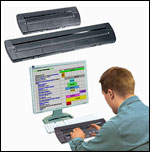 We start off the new year with a fantastic deal on an original Focus 40 Braille Terminal. This is a fantastic bargain for the desktop/laptop PC user looking for a 40-Cell USB Braille display for less than 1K! This unit is in pristine condition and works seamlessly with the globally acclaimed JAWS For Windows Screen Reader, along with all other commercial screen reading solutions. Price includes shipping within the 48 Continental United States and this unit will be sold on a first come, first serve basis. For more information, email featured@flying-blind.com or call +1 (216) 381-8107 today.
Greetings,
News
1.) Tek Talk on the System Access Mobile Network
Learn about accessing the System Access Mobile Network on your iDevice on Tek Talk on GMT Tuesday, 8 January at 01:00:
http://conference321.com/masteradmin/room.asp?id=rsc9613dc89eb2
2.) AudioScreen Add-On for NVDA
Here are three items related to NVDA: An add-on, AudioScreen, exists which enables blind users to receive audio information about graphics such as maps and diagrams:
http://www.nvaccess.org/audioScreen/
3.) NVDA Snapshots Support PowerPoint
The latest snapshots, up-to-the-minute beta versions of the free screen reader, support PowerPoint access:
http://www.nvda-project.org/wiki/Snapshots
4.) VMouse for NVDA is a £2.99 add-on which significantly enhances navigation options
http://www.vict-consultancy.co.uk/content/vMouse_for_NVDA.html
5.) New York Times for iPhone with Improved Accessibility
Maccessibility announces that New York Times for iPhone has been Updated with Improved Accessibility:
http://maccessibility.net/2013/01/02/new-york-times-for-iphone-updated-with-improved-accessibility/
6.) NFB Newsline iOS App Upgrade
Another iOS app to get an upgrade is the NFB Newsline app, incorporating their recently-added publications such as the Braille Forum, CNN and the Huffington Post, allowing for weather alerts and making other interface changes. To offer feedback, email:
swhite@nfb.org
7.) Mailing List for iDevice App Recommendations
A new mailing list has been created for offering and requesting information and assistance for making app recommendations for i-devices using VoiceOver. To join, send a blank message to:
IDevices-join@GatewayForTheBlind.com
8.) Free Weekly Compilations of Periodical Information
Three textual compilations of online periodical information are compiled weekly and are available free for the browsing: Science and Health News, Tech Update and Slate:
http://www.batsupport.com/mags/will_smith/
9.) Read the @Freedom Scientific Newsletter
10.) The Difference Between an iPad Mini and a Regular iPad
From MacWorld Australia, learn about “The difference between an iPad Mini and a regular iPad”:
http://www.macworld.com.au/features/the-difference-between-an-ipad-mini-and-a-regular-ipad-83043/
11.) iPad and Siri Tips from OS X Daily
From OS X Daily come:
“14 Must-Know iPad Tips & Tricks”:
http://osxdaily.com/2012/03/20/14-ipad-tips-tricks/
“Write & Send a Complete Email with Siri Faster Than Ever”:
http://osxdaily.com/2012/12/30/write-send-complete-email-siri/
And “Other Siri Tips”:
http://osxdaily.com/tag/siri/
12.) SpeedDots Tactile Screen Protectors
SpeedDots has announced their lineup of tactile screen protectors for the iPad Mini, iPad, iPhone and iPod. They have enhanced their existing layouts and created a new phone-only layout for the iPhone.
http://www.speeddots.com/faq.php
13.) MS Office Is Coming, but Are You Ready?
The next EASI free webinar is entitled “MS Office is coming – but are you READY!”, and takes place on Tuesday, 8 January at 19:00 GMT:
http://easi.cc/clinic.htm
14.) Main Menu Demos of Tiny Tunes and Text Detective
On Main Menu for GMT Saturday 5 January, we hear a demo of the new Tiny Tunes talking mp3 player from Future Aids, a demo of using the Text Detective app for OCR on an iPhone, and a demo of syncing notes between a Mac and iOS device via iCloud.
http://mainmenu.acbradio.org/
15.) Configuring the Samsung Galaxy S3 for Blind Users
This post from Jeffrey’s Soapbox is entitled “Configuring your Samsung Galaxy S3 for Blind Users – Part 1: Getting Rid of the Samsung Keyboard in favor of the Android Stock One”
http://blog.blackspheretech.com/?p=191
16.) Latest Podcasts on J-Say and iPhone Apps
Among the latest podcasts:
Using J-Say or MagniTalk for hands-free, eyes-free computing:
http://EyesOnSuccess.net/eos_1301_podcast.mp3
Dictabulus: Dictate Text on your iPhone for use on your Mac:
http://www.applevis.com/podcast/episodes/dictabulus-dictate-text-your-iphone-use-your-mac
TypeInBraille: Use Braille to Enter Text on your iPhone:
http://www.applevis.com/podcast/episodes/typeinbraille-use-braille-enter-text-your-iphone
Light Detector: Use the Camera on your iDevice to Transform any Light Source into Sound:
http://www.applevis.com/podcast/episodes/light-detector-use-camera-your-idevice-transform-any-light-source-sound
TapTheMole: Test and Train your Reflexes With this Perfect Time Killer Game for iOS:
http://www.applevis.com/podcast/episodes/tapthemole-test-and-train-your-reflexes-perfect-time-killer-game-ios
17.) Making the Switch to VoiceOver on a Mac
This well-thought-out post is entitled “A Guide to Making the Switch from Using a Windows Screen Reader to VoiceOver on a Mac”:
http://www.applevis.com/guides/guide-making-switch-using-windows-screen-reader-voiceover-mac
Subscription Information
Are you on Facebook? Stop by and “Like” Flying Blind, LLC to begin receiving Top Tech Tidbits for Thursday as part of your Facebook News Feed at www.facebook.com/flyingblindllc. If you prefer an RSS Feed, you can access Flying Blind, LLC Publications as they become available using https://www.toptechtidbits.com/rss.xml. And finally, if audio / video is more your style then you can follow Flying Blind, LLC on YouTube at www.youtube.com/flyingblindllc.
Shopping for accessible technology? Check out the Flying Blind, LLC Online Store at www.flying-blind.com/store.html. All products offered in the Flying Blind, LLC Online Store are products that Larry L. Lewis, Jr. either personally uses, or publicly endorses. Flying Blind, LLC is proud to offer free shipping & handling on all of our products, within the 48 continental United States.
Would you like to receive text-only versions of Flying Blind, LLC Publications? If so, find the link at the bottom of each Newsletter titled “Update Profile/E-Mail Address”, and check this option.
Feel free to forward individual Tidbits, or the entire tidbits issue, to interested people (just make sure they don’t already receive it; a lot do!) When doing this, please have the courtesy to cite your source, perhaps directing them to the Tidbits Archive (see below.)
Tidbits is intentionally concise, and we know a lot of people may not understand some items because little explanation is given. If a particular Tidbit brings up a question in your mind, feel free to ask, and we will try to answer as time and knowledge permit.
Visit the 2012 Tidbits Archive at https://www.toptechtidbits.com/tidbits2012.html where you can grab back issues. All that welcome information for future issues can be directed to our editor, Dean Martineau, at dean@topdotenterprises.com.
You can subscribe to Flying Blind, LLC Publications on the Flying Blind, LLC Website at: http://www.flying-blind.com. This method will provide you with an accessibly friendly and secure medium through which you can subscribe to our mailing list. Just enter your email address, click send, and begin receiving Flying Blind, LLC Publications. It’s that easy.