

The Week’s News in Access Technology
A Flying Blind, LLC Publication
http://www.flying-blind.com/
This Week’s Featured Advertisement
One Refurbished Brailliant B 80 New Generation Refreshable Braille Terminal for $6,795.00 USD
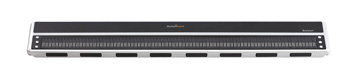
Flying Blind, LLC is pleased to offer one lucky user who loves a whole lot of Braille at their fingertips the chance to own a Brailliant B 80 New Generation Refreshable Braille Terminal for over $1,200.00 USD off of its suggested list price. In an age when Braille displays pride themselves on a reduction in size, sometimes bigger really is better, especially when you need those 80 cells to navigate the nuances of multitasking through a complex graphical Macintosh or Windows desktop environment. We’re offering this display to the serious Braille user who needs to access a lot of Braille to get a lot of work done at one time. This unit’s ergonomic thumbkeys coupled with crisp and responsive Braille make it a must-have for the Braille user wishing to keep in step with their sighted peers. Aside from an over $1,200.00 USD savings, you’ll also receive a one-year manufacturer’s warranty when purchasing this unit. Throw in free shipping within the 48 Continental United States, and you have yourself the Cadillac of Braille displays for the price of a Sedan! This is a single unit that will be sold on a first come, first serve basis. Price includes shipping within the Continental United States. To be the first to secure this unit please use the Buy Now link included below. For more information or to order this product offline, email featured@flying-blind.com or call +1 (216) 381-8107 today!
Buy Now – One Refurbished Brailliant B 80 New Generation Refreshable Braille Terminal for $6,795.00 USD – Flying Blind, LLC Online Store
https://www.paypal.com/cgi-bin/webscr?cmd=_s-xclick&hosted_button_id=HMEYPZTL8LJBQ
Greetings,
News
1A.) What’s New in iOS 7.1 for Blind Users
Feedback seems pretty positive about the recent iOS upgrade to version 7.1. Read about the accessibility-related changes here:
http://www.applevis.com/blog/apple/whats-new-and-changed-blind-and-low-vision-users-ios-71
1B.) And for general 7.1 coverage
2.) Seeing Assistant Home Version 1.5
Version 1.5 of the iOS App “Seeing Assistant Home” has been released with a new iOS 7 user interface and bug fixes. This is the App Store link:
https://itunes.apple.com/us/app/seeingassistant-home/id625146680?mt=8
3.) How to manually control when Siri listens to you with iOS 7.1
http://www.imore.com/how-manually-control-when-siri-listens-you-ios-71
4.) How to Report an iOS Bug to Apple
And to finish iOS-related material, unless something comes to hand before I send this issue off, this Blog Post from Applevis is called: “Found a Bug in iOS? Here’s How to Let Apple Know and Why You Should:”
http://www.applevis.com/blog/advocacy/found-bug-ios-here%E2%80%99s-how-let-apple-know-and-why-you-should
5A.) Computing Material from HowToGeek
Let’s catch up on some good computing-related material from HowToGeek:
5B.) How to Get Navigation Directions (Even Offline) Without Buying a GPS
http://www.howtogeek.com/182965/how-to-get-navigation-directions-even-offline-without-buying-a-gps/
5C.) Are PCs Dying? Of Course Not, Here’s Why
http://www.howtogeek.com/183381/are-pcs-dying-of-course-not-heres-why/
5D.) Who Is Making All This Malware and Why?
Who is Making All This Malware and Why?
http://www.howtogeek.com/183642/who-is-making-all-this-malware-and-why/
5E.) What Is a Botnet?
What is a Botnet?
http://www.howtogeek.com/183812/htg-explains-what-is-a-botnet/
5F.) And Cleaning your Computer Inside and Out
http://www.howtogeek.com/school/pc-maintenance-for-beginners/lesson2/
6A.) Getting the Most from Your Slow Cooker
CAVICasts seem to be coming thick and fast these days, and the upcoming one is “Getting the Most From Your Slow Cooker.” Like all these, it’s on TeamTalk at:
http://tt.cucat.org
6B.) If you want to learn how to set up TeamTalk, read this
http://www.wiki.cucat.org/index.php?n=Main.SettingUpTeamtalk
6C.) Recordings of 2014 CAVICasts
Recordings of 2014 CAVICasts on BossJock, text gaming, and Adobe Digital Editions are available here:
http://www.cucat.org/cc/2014/
7.) An Introduction to Windows 8.1 Webinar
Cathy Ann Murtha offers a free webinar, “An Introduction to Windows 8.1,” on Saturday, 5 April. Learn about it and register here:
http://www.blindtraining.com/Seminars/Win8.1Intro.html
8.) Commtech Webinar on Office in the Cloud
Another webinar, this one from Commtech, LLC and costing $19.95, is on using Microsoft products in the cloud from a blindness perspective. It will occur on Friday, 28 March at 17:00 GMT:
http://commtechusa.net/using-office-in-the-cloud/
9.) Select All Text with the Same Formatting in Word
You might learn something about Microsoft Word from this and the linked article: “Select All Text with the Same Formatting in Word (and Other Word Tips)”
http://lifehacker.com/select-all-text-with-the-same-formatting-in-word-and-o-1542256633
10.) March 2014 AccessWorld Reviews the Kindle Fire HDX
The March 2014 issue of AccessWorld features reviews of the Kindle Fire HDX 8.9, Windows Phone, iTunes Radio, the Chromecast, wireless content on the new generation Victor Reader Stream, and more:
http://www.afb.org/aw/main.asp
11.) The Mozilla-Discuss Email List
If you use Mozilla Firefox or Thunderbird, have questions about Mozilla products in general, or have any tips or tricks you can offer, the Mozilla-discuss email list may be for you. To join, send a blank message to:
mozilla-discuss-subscribe@emissives.com
12A.) Sendero Annual GPS Updates
Sendero Group offers its annual updates to its GPS programs for the Braille Note and Braille Sense product families. These updates contain the latest map data, and cost much less than they did in previous years. Braille Note users can upgrade here:
http://senderogroup.com/products/shopgps.htm#gpsupg
12B.) And Sense product users here
http://senderogroup.com/products/shopvsnav.htm#upg
13.) Free Mystic Access Sendero Tutorials
Speaking of these GPS products, Mystic Access now makes its tutorials, SenderoMaps (more than a map manager), and Sense Navigation, a bundle with both tutorials in one zip file and is free for anyone to download. Just add them to the cart, and the price will show as free:
http://www.mysticaccess.com
14.) Tek Talk on SendSpace
Learn all about SendSpace on Tek Talk on GMT Tuesday, 18 March at 00:00:
http://conference321.com/masteradmin/room.asp?id=rsc9613dc89eb2
15.) Beta Testers for Apache OpenOffice Accessibility
Apache OpenOffice is a free Office suite, and the developers are in the process of introducing accessibility features. They have put out a general call for Beta testers of the program:
https://blogs.apache.org/OOo/entry/seeking_beta_testers_for_apache
16.) Review of the RiVO
Read a review of the RiVO (Remote Interface to VoiceOver,) and extensive responses from the developer of the product:
http://www.applevis.com/accessory-reviews/bluetooth-keyboards/rivo-remote-interface-voiceover#comment-22774
17A.) This Week’s Audio
Finishing with this week’s audio:
17B.) There’s a New Tech Doctor Podcast “Music By Ear” featuring Bill Brown
Two podcasts from BGZ:
17C.) Freemake Audio Converter
http://www.blind-geek-zone.net/freemake-audio-converter/
17D.) And GMA Lander Demonstration
http://www.blind-geek-zone.net/gma-lander-demonstration/
And From the Blind Podcaster comes:
17E.) Why Choose Android
http://blindpodcaster.com/tech-bits-why-choose-android/
17F.) Using Band-in-a-Box with JAWS
And program 1411 of Eyes on Success is called “Using Band-in-a-Box with JAWS:”
http://www.eyesonsuccess.net/
Subscription Information
SUBSCRIBE
Do you, a friend, or colleague wish to receive Flying Blind, LLC Publications? If so, please use or pass along our CAPTCHA-free sign-up link, which is: https://toptechtidbits.com/subscribe. You can also subscribe to Flying Blind, LLC Publications on the Flying Blind, LLC Website at: http://www.flying-blind.com. Any method will provide you with an accessibly friendly and secure medium through which you can subscribe to our mailing list. Just enter your name and email address, click send, and begin receiving Flying Blind, LLC Publications. It’s that easy.
Are you on Facebook? Stop by and “Like” Flying Blind, LLC to begin receiving Top Tech Tidbits for Thursday as part of your Facebook News Feed: http://www.facebook.com/flyingblindllc.
YOUTUBE
If audio / video is more your style, then you can follow Flying Blind, LLC on YouTube at: http://www.youtube.com/flyingblindllc.
RSS FEED
If you prefer an RSS Feed, you can access Flying Blind, LLC Publications as they become available using: https://www.toptechtidbits.com/rss.xml.
ONLINE STORE
Shopping for accessible technology? Check out the Flying Blind, LLC Online Store at: https://www.toptechtidbits.com/store.html. All products offered in the Flying Blind, LLC Online Store are products that Larry L. Lewis, Jr. either personally uses, or publicly endorses. Flying Blind, LLC is proud to offer free shipping & handling on all orders over $100.00 USD within the 48 continental United States.
TEXT-ONLY
Would you like to receive text-only versions of Flying Blind, LLC Publications? If so, find the link at the bottom of each Newsletter titled “Update Profile/E-Mail Address”, and check this option.
QUESTIONS
Tidbits is intentionally concise, and we know a lot of people may not understand some items because little explanation is given. If a particular Tidbit brings up a question in your mind, feel free to ask, and we will try to answer as time and knowledge permit.
ARCHIVE
Visit the 2014 Tidbits Archive at: https://www.toptechtidbits.com/tidbits2014.html where you can grab back issues.
CONTENT
Any information for future issues of Top Tech Tidbits may be directed to our editor, Dean Martineau, at: dean@topdotenterprises.com.