

The Week’s News in Access Technology
A Flying Blind, LLC Publication
http://www.flying-blind.com/
This Week’s Featured Advertisement
One Barely Used RefreshaBraille 18 Cell Refreshable Braille Display For $1,275.00 USD!!!
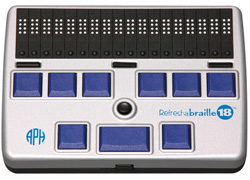
This week we are pleased to offer you One Barely Used RefreshaBraille 18 Cell Refreshable Braille Display with both wireless and Bluetooth Connectivity for only $1,275.00 USD! This unit has been used for less than two hours and is as close to brand new as a unit can get! It’s the perfect 18 Cell companion for portable, wireless Braille users who need to connect to a PC or Macintosh from time to time. It’s the only Braille display on the market today that allows you to turn the display 180 degrees and invert the keyboard and position of the display for comfort while being able to effortlessly enter Braille! The RefreshaBraille connects with a variety of Windows, iOS, and Android Screenreaders, touting both versatility and compatibility in a sleek, yet rugged design. With free shipping within the Continental United States, this is an over 25% savings on a portable display with plenty of cells to get the job done! This unit will be sold on a first come, first serve basis. To be the first to secure this unit please use the Buy Now link included below. For more information, or to order this product offline, email featured@flying-blind.com or call +1 (216) 381-8107 today.
Buy Now – One Barely Used RefreshaBraille 18 Cell Refreshable Braille Display – $1,275.00 USD – Flying Blind, LLC Online Store
https://www.paypal.com/cgi-bin/webscr?cmd=_s-xclick&hosted_button_id=ZXC9ZQ68M8H36
Greetings,
News
1.) Tek Talk on the ODIN VI Phone
Learn about the ODIN VI, a cell phone for those who may not want or need all the features of a smart phone, on Tek Talk on GMT Tuesday, 10 June at 00:00:
http://conference321.com/masteradmin/room.asp?id=rsc9613dc89eb2
Two useful books have recently become available:
2A.) iOS Access for All
The first, iOS Access for All: Your Comprehensive Guide to Accessibility for iPad, iPhone, and iPod Touch is now available for $20 in unprotected Epub format at:
http://iosaccessbook.com
2B.) Learn to Use the Mac with VoiceOver
Second, Learn to Use the Mac with VoiceOver, is available in many formats, electronic and paper, for $20 from National Braille Press:
http://www.nbp.org/ic/nbp/MAC.html
3.) Cisco Academy Courses for Next Semester
Here is the page where you can read about the Courses the Cisco academy is offering next semester starting in august:
http://wiki.cucat.org/index.php?n=Main.Courses
4.) Summary of the WWDC 2014 Keynote
A lot of exciting features appear to be coming to the iOS operating system in the fall. Here’s a summary:
http://www.applevis.com/blog/apple-ios-mac-os-x-news/summary-announcements-wwdc-2014-keynote
Here are a couple of potentially informative items from HowToGeek:
5A.) 8 Backup Tools Explained for Windows 7 and 8
http://www.howtogeek.com/189452/8-backup-tools-explained-for-windows-7-and-8/
5B.) Network Security: Windows Defender and a Malware-Free System
http://www.howtogeek.com/school/windows-network-security/lesson3/
6.) EASI Free Webinars on Math eText and Audacity
EASI offers two free webinars in June: Using Mathematics eText in the Classroom, Tuesday, 17 June at 18:00 GMT, and Audacity: The Free Open Source Tool to Create Quality Audio, Friday 27 June at 19:00 GMT:
http://easi.cc/clinic.htm
7.) San Francisco LightHouse Assistive Technology Survey
The San Francisco LightHouse for the Blind and Visually Impaired, in conjunction with an outside research organization, is interested in asking people who are blind or visually impaired to complete a short online survey about assistive technology. Participants can enter to receive one of three Amazon gift cards:
https://www.surveymonkey.com/s/AT_design_PWVI
8.) Free Talking Prescription Labels from Walgreens
Walgreens Now Offers Free Talking Prescription Labels in retail and mail order pharmacies:
http://lflegal.com/2014/06/walgreens-talking/
9A.) Free GoldWave Audio Editor Class
A free class on the GoldWave Audio Editor has been made available. These links all worked when I tested them, I hope they continue to do so. Here is the link to the MP3 file:
https://t.co/eSX8zfZQEz
9B.) Here is the outline
9C.) And here is a listof GoldWave Keystrokes
10.) My New Synology NAS: Great Product, NASty Accessibility
Jonathan Mosen writes about a great back/cloud storage system with major accessibility challenges: “My new Synology NAS. Great Product, NASty Accessibility”:
http://mosen.org/index.php/my-new-synology-nas-great-product-nasty-accessibility/
Turning to available audio for the week:
11A.) Talking Book Machine and Flash Drive as Study Aids
Here is a Sound Cloud recording entitled “Use a free Digital Talking Book Machine and a Flash Drive as Study Aids with Assistive Tech Beginners”:
https://soundcloud.com/chancey-fleet/use-a-free-digital-talking
11B.) From the Serotalk Team comes High Contrast Episode 21
http://serotalk.com/2014/05/31/high-contrast-episode-21-tangent-mode-on/
11C.) That Android Show Episode 28
http://thatandroidshow.com/2014/05/28/that-android-show-episode-28-chips-and-beer/
11D.) And Triple-Click Home Episode 29
http://tripleclickhome.com/2014/05/23/triple-click-home-episode-29-eat-something/
11E.) AccessTalk Podcast 25
From the UK, AccessTalk Podcast 25 covers MotoE, BBC iPlayer, Developer Conferences & The Surface Pro 3:
http://accesstalk.co.uk/podcast-25/
11F.) Interview with the Developer of BlindSquare
Here’s a VipAdvisor Interview with Ilkka Pirttimaa, Developer of BlindSquare: How it started; What’s new in 2.0; plus future plans!
https://audioboo.fm/boos/2214374-vipadvisor-interview-with-ilkka-pirttimaa-developer-of-blindsquare-how-it-started-whats-new-in-2-0-plus-future-plans-blindsquare
11G.) TextSync Wireless Keyboard for iOS
AppleVis gives us TextSync: Turns Your Laptop or Desktop Computer into a Wireless Keyboard for Your iOS Device:
http://applevis.com/podcasts
11H.) And Eyes on Success 1423 is titled “Becoming a Blind Physician”
Subscription Information
SUBSCRIBE
Do you, a friend, or colleague wish to receive Flying Blind, LLC Publications? If so, please use or pass along our CAPTCHA-free sign-up link, which is: https://toptechtidbits.com/subscribe. You can also subscribe to Flying Blind, LLC Publications on the Flying Blind, LLC Website at: http://www.flying-blind.com. Either of these methods will provide you with an accessibly friendly and secure medium through which you can subscribe to our mailing list. Just enter your name and email address, click send, and begin receiving Flying Blind, LLC Publications. It’s that easy.
Are you on Facebook? Stop by and “Like” Flying Blind, LLC to begin receiving Top Tech Tidbits for Thursday as part of your Facebook News Feed: http://www.facebook.com/flyingblindllc.
YOUTUBE
If audio / video is more your style, then you can follow Flying Blind, LLC on YouTube at: http://www.youtube.com/flyingblindllc.
RSS FEED
If you prefer an RSS Feed, you can access Flying Blind, LLC Publications as they become available using: https://www.toptechtidbits.com/rss.xml.
ONLINE STORE
Shopping for accessible technology? Check out the Flying Blind, LLC Online Store at: https://www.toptechtidbits.com/store.html. All products offered in the Flying Blind, LLC Online Store are products that Larry L. Lewis, Jr. either personally uses, or publicly endorses. Flying Blind, LLC is proud to offer free shipping & handling on all orders over $100.00 USD within the 48 continental United States.
QUESTIONS
Tidbits is intentionally concise, and we know a lot of people may not understand some items because little explanation is given. If a particular Tidbit brings up a question in your mind, feel free to ask, and we will try to answer as time and knowledge permit.
ARCHIVE
Visit the 2014 Tidbits Archive at: https://www.toptechtidbits.com/tidbits2014.html where you can grab back issues.
CONTENT
Any information for future issues of Top Tech Tidbits may be directed to our editor, Dean Martineau, at: dean@topdotenterprises.com.