

The Week’s News in Access Technology
A Flying Blind, LLC Publication
http://www.flying-blind.com/
This Week’s Featured Advertisement
One Gently Used Braille Note Apex 32-Cell Notetaker with QWERTY Style Keyboard for $2,495.00 USD – Flying Blind, LLC Online Store
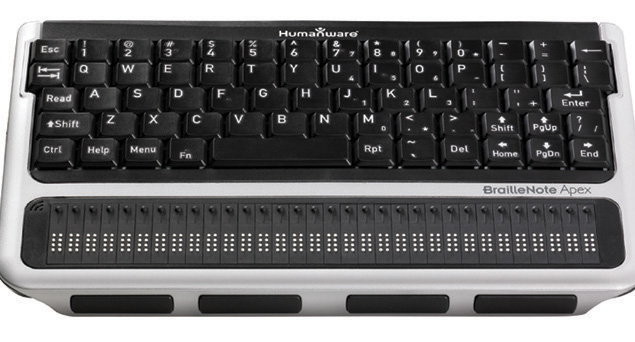
Flying Blind, LLC is pleased to offer one fortunate user One Gently Used Braille Note Apex 32-Cell Notetaker with QWERTY Style Keyboard (purchased new in early 2014) for $2,495.00 USD. This unit has been responsibly cared for and is now begging to be used a whole lot more by one lucky recipient in the market for a notetaker line that has withstood the test of time. This unit is in pristine condition, providing you with an approximate $3,000.00 USD savings off of this unit’s recommended list price. The BrailleNote family of products has been setting standards for intuitive, powerful, and portable information management for the past 14 years. This sleek and robust solution provides endless possibilities and opportunities for that one person wishing to give it a good home and benefit from its countless uses! Free shipping within the 48 Continental United States. This is a single unit that will be sold on a first come, first serve, basis. To be the first to secure this unit, please use the Buy Now link included below. For additional questions, or to purchase this product offline, email featured@flying-blind.com or call +1 (216) 381-8107 today!
Buy Now – One Gently Used Braille Note Apex 32-Cell Notetaker with QWERTY Style Keyboard for $2,495.00 USD – Flying Blind, LLC Online Store
https://www.paypal.com/cgi-bin/webscr?cmd=_s-xclick&hosted_button_id=7TZZA4QB9XZGW
Greetings,
News
1.) Guides for Visually Impaired College Students
This revised Fred’s Head post contains links to two guides related to colleges and adaptation to college for visually impaired students:
http://www.fredshead.info/2015/08/a-guide-for-colleges-and-visually.html
2.) August 2016 AccessWorld Reviews the BrailleNote Touch
Among the articles to be found in the August 2016 issue of AccessWorld are “The HumanWare BrailleNote Touch: A Braille Tablet for the 21st Century,” “The I.D. Mate Galaxy from En-Vision America Takes the Hassle Out of Scanning Bar Codes,” “A Review of Sonar Glasses from G-Technology Group,” “The Accessible Kitchen: Using the Instant Pot Smart Bluetooth-Enabled Multifunctional Pressure Cooker,” “Choosing the Right Electronic Magnifier, Part 2: Larger Magnifier Systems, Specs, and Features,” “Described Video via Blindy TV: “Taking the Vision out of Television”, and “The Apple Worldwide Developers Conference 2016: What’s Coming This Fall:”
http://www.afb.org/aw/main.asp
3.) First BrailleNote Touch Update
The first update for the aforementioned Braillenote Touch, brings better audio quality, camera activation, and other enhancements:
http://www.humanware.ca/web/en/Newsletter/1008161258.htm
4A.) Tek Talk: Consumer Items You Find Accessible
Tek Talk for GMT Tuesday, 16 August will feature contributions from listeners of “Consumer Items Around The Home That You Find Accessible Or Have Found A Work Around For.” The program will feature several five-minute presentations on different devices or topics:
http://conference321.com/masteradmin/room.asp?id=rsc9613dc89eb2
4B.) Tek Talk Archives from the Tidbits Break
Meanwhile, Tek Talk programs that aired during our Tidbits break have now been archived. They concern The Forsythe Center for Employment and Entrepreneurship, Hadley Institute for the Blind, and the Windows 10 Anniversary Edition:
http://accessibleworld.org/archives/tek-talk-archives
5.) Uber Accessibility Web Site
Uber has launched an accessibility web site in the US. The site gives policy information and provides a contact link to a dedicated accessibility team.
https://accessibility.uber.com
6.) What’s New in Accessible Apps for July 2016
Since we weren’t around for the first week in August, we only now mention “AppleVis Unlimited: What’s New in Accessible Apps for July 2016:”
http://www.applevis.com/blog/apple-apple-tv-apple-watch-ios-ios-apps-mac-os-x-news-opinion/applevis-unlimited-whats-new
7A.) Ranking Screen Readers in Windows10 Anniversary Update
A lot of information is available concerning the Anniversary Edition of Windows 10. First, this Cool Blind Tech article is worth a perusal: “Ranking Screen Readers in Windows10 Anniversary Update: The Results Will Surprise You!”
https://www.coolblindtech.com/ranking-screen-readers-in-windows10-anniversary-update-the-results-will-surprise-you/
7B.) New Accessibility Documentation for Windows 10
Much has been done to improve the Narrator screen reader, and this blog post contains links to that documentation and more:
https://blogs.msdn.microsoft.com/accessibility/2016/08/09/new-accessibility-documentation-for-the-windows-10-anniversary-update/
7C.) Windows 10: The 10 Best New Features
PC World offers “Windows 10: The 10 Best New Features to Try First:”
http://www.pcworld.com/article/2874400/windows/windows-10-the-10-coolest-features-you-should-check-out-first.html#tk.rss_all
7D.) Review of the Windows 10 Anniversary Update
And here is a Cool Blind Tech review of the new version itself:
https://www.coolblindtech.com/polishing-windows-10-microsoft-solidifies-plans-anniversary-update/
8.) Freedom Scientific Free Webinars on JAWS 18
Freedom Scientific has announced its upcoming list of free webinars. They include a series on “What’s New in JAWS 18”, running from 5 October to 16 November, “Google Docs and Sheets with JAWS and MAGic,” 19 October, “Twitter with JAWS: New Accessibility Features,” 30 November, and “Track Changes in Microsoft Word with JAWS,” 7 December:
http://www.freedomscientific.com/Services/TrainingAndCertification
9.) FSCast 129
Microsoft Mail accessibility and proposed rules for local web site accessibility are among the topics for FSCast Episode #129:
http://www.freedomscientific.com/About/FSCast
10.) Three Episodes of Eyes on Success
We have three episodes of Eyes on Success to mention: 1631 Project BLAID Navigation Device, 1632 Employment Considerations for the Blind, and 1633 Learning to be an Entrepreneur:
http://eyesonsuccess.net
11.) Hadley iFocus Video: Turning On and Off VoiceOver
Visit Hadley’s YouTube Channel to find the new iFocus Instructional Video “Turning On and Off VoiceOver” to learn the latest tips for using the accessibility features on the iPhone, iPad and iPod Touch at:
https://youtu.be/YImktawfFn8
12.) CAVI will offer a four-session, $8 class on PowerPoint starting 19 August
http://wiki.cucat.org/pmwiki.php/Main/Powerpoint
Flying Blind, LLC Classified Ads
1.) One Gently Used Braille Note Apex 32-Cell Notetaker with QWERTY Style Keyboard – Flying Blind, LLC Online Store
Price: $2,495.00 USD
Savings: Offered here at approximately $3,000.00 USD off its suggested list price.
Contact: http://bit.ly/2aN8Ldx.
Description: The BrailleNote family of products has been setting standards for intuitive, powerful, and portable information management for the past 14 years. This sleek and robust solution provides …
2.) One Refurbished Braille Sense U2 32 Cell Notetaker with Braille Keyboard – Flying Blind, LLC Online Store
Price: $2,795.00 USD
Savings: Offered here at approximately $2,800.00 USD off its suggested list price.
Contact: http://bit.ly/29QhqbK.
Description: The U2 provides unparalleled Braille access to PDF, PowerPoint, and Excel files, connects you to the Cloud via Dropbox, and puts the wide world of social networking at your fingertips …
3.) One Gently Used Optelec Clearview Plus 22 Inch Monitor with Ultra Flex Arm – Flying Blind, LLC Online Store
Price: $1,995.00 USD
Savings: Offered here at approximately $1,300.00 USD off its suggested list price.
Contact: http://bit.ly/29Qym36.
Description: Optelec’s Clearview line of video magnifiers is Flying Blind, LLC’s preferred desktop solution for the low-vision user seeking comfort, simplicity, ergonomics, and versatility …
Flying Blind, LLC Online Store Highlights
1.) ‘iOS in the Classroom: A Guide for Teaching Students with Visual Impairments, iOS 9 Edition’ Authored By Larry L. Lewis, Jr., President, Flying Blind LLC, and Published by AFB Press – AFB Online Store
Paperback: $29.95, Online: $17.95, ePUB: $20.95, Kindle: $20.95
http://bit.ly/iOS9-ITC-AFB-FBLLC
This book represents a ‘must have’ for any direct service provider working with vision impaired consumers who are using iOS technology within their educational or pre-vocational settings …
2.) Silver Indoor Outdoor Talking Thermometer for $16.95 USD – Flying Blind, LLC Online Store
http://bit.ly/1HHaM7I
Indoor and outdoor temperature spoken at the touch of a button, Fahrenheit or Celsius, volume control and on/off switch. LCD visual display can show either indoor or outdoor temperature …
3.) Perkins Mini Braille Display 16 Cell for $1,495.00 USD Each and 24 Cell for $2,295.00 USD Each – Flying Blind, LLC Online Store
http://bit.ly/1l9TSEw
A portable Braille display with more to offer for less money. The Mini provides Braille input and output for PCs, tablets, mobile phones, and gives you that internal notetaking functionality …
4.) Large Print Address Book for $16.00 USD – Flying Blind, LLC Online Store
http://bit.ly/1Q1LZxC
Spiral bound book. Holds up to 500 address listings. Three address listings per page. Includes 20/20 pen. Durable covers with inside front and back pockets. Alphabetical tabs and ample room …
5.) Smart Beetle 14 Cell Refreshable Braille Display with Executive Products Carrying Case for $1,275.00 USD – Flying Blind, LLC Online Store
http://bit.ly/1OHltXe
A Pocket-sized Power Pack That Fits Your Lifestyle and Your Budget! Ultra-Portable 14-Cell Braille Display with 5 Simultaneous Bluetooth Connections! Smart Beetle is a 14 Cell Braille …
6.) Large Print Check Register for $8.75 USD – Flying Blind, LLC Online Store
http://bit.ly/1TmcA6r
Spiral bound register helps keep better control of check recording. Contains spaces for 14 entries per full page. Size: 5″ x 9″ …
7.) Braille Edge 40 Braille Display with Executive Products Carrying Case for $2,795.00 USD – Flying Blind, LLC Online Store
http://bit.ly/1O5ircy
The most powerful and versatile Braille display, with the features of a basic Notetaker! Manage Your Daily Life! Braille EDGE 40 is not only a most reliable, high-performance refreshable Braille …
Flying Blind, LLC Subscription Information
SUBSCRIBE
Do you, a friend, or colleague wish to receive Flying Blind, LLC Publications? If so, please use or pass along our CAPTCHA-free sign-up link, which is: https://toptechtidbits.com/subscribe. You can also subscribe to Flying Blind, LLC Publications on the Flying Blind, LLC Website at: http://www.flying-blind.com. Either of these methods will provide you with an accessibly friendly and secure medium through which you can subscribe to our mailing list. Just enter your name and email address, click send, and begin receiving Flying Blind, LLC Publications. It’s that easy.
WEBSITE
Visit Flying Blind, LLC online at http://www.flying-blind.com.
Are you on Facebook? Stop by and “Like” Flying Blind, LLC to begin receiving Flying Blind, LLC Publications as part of your Facebook News Feed: http://www.facebook.com/flyingblindllc.
YOUTUBE
If audio / video is more your style, you can follow Flying Blind, LLC on YouTube at: http://www.youtube.com/flyingblindllc.
RSS FEED
If you prefer an RSS Feed, you can access Flying Blind, LLC Publications as they become available using: https://www.toptechtidbits.com/rss.xml.
ONLINE STORE
Shopping for accessible technology? Check out the Flying Blind, LLC Online Store at: https://www.toptechtidbits.com/store.html. All products offered in the Flying Blind, LLC Online Store are products that Larry L. Lewis, Jr. either personally uses, or publicly endorses. Flying Blind, LLC is proud to offer free Shipping & Handling on all orders over $100.00 USD within the 48 continental United States.
QUESTIONS
Tidbits are intentionally concise. As a result we know that some readers may not always understand all of the items listed because little explanation is given. If a particular Tidbit brings up a question in your mind, feel free to ask, and we will try to answer as time and knowledge permit.
ARCHIVE
Visit the 2016 Tidbits Archive at: https://www.toptechtidbits.com/tidbits2016.html where you can grab back issues.
CONTENT CONTRIBUTORS
Any information for future issues of Top Tech Tidbits may be directed to our editor, Dean Martineau, at: editors@toptechtidbits.com.