

The Week’s News in Access Technology
A Flying Blind, LLC Publication
http://www.flying-blind.com/
This Week’s Featured Advertisement
One Gently Used Optelec Clearview Plus HD with 22 Inch Monitor for $2,195.00 USD!!!
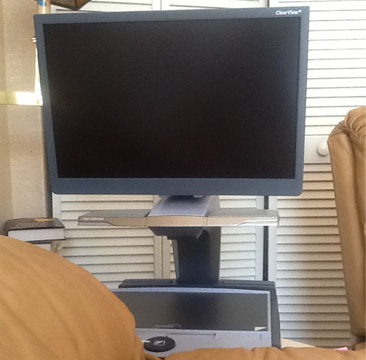
Flying Blind, LLC is pleased to offer One Gently Used Optelec Clearview Plus HD with 22 Inch Monitor to a low-vision customer in the market for a truly fantastic bargain on a desktop video magnifier! Optelec’s Clearview line of video magnifiers is Flying Blind, LLC’s preferred desktop solution for the low-vision user seeking comfort, simplicity, ergonomics, and versatility all while accessing a wide variety of images and information. The Clearview is simple enough to use while providing a variety of options when viewing information in educational, vocational, and home settings! This unit has been used for less than 10 hours and still has 15 months remaining on its Manufacturer’s Warranty. Price includes shipping within the 48 Continental United States, giving one lucky customer an approximate savings of over $1,100.00 USD! This is a single unit that will be sold on a first come, first serve basis. To be the first to secure this unit please use the Buy Now link included below. For more information, or to order this product offline, email featured@flying-blind.com or call +1 (216) 381-8107 today.
Buy Now – One Gently Used Optelec Clearview Plus HD with 22 Inch Monitor for $2,195.00 USD – Flying Blind, LLC Online Store
https://www.paypal.com/cgi-bin/webscr?cmd=_s-xclick&hosted_button_id=HBAY4X2TBMAEY
Greetings,
We start this week with NVDA happenings:
News
1A.) NVDA 2015.3RC1 Released
NVDA 2015.3RC1 has just been released. This is a release candidate, which means that unless any critical issues are found, this will be identical to the final 2015.3 release. Highlights of this release include initial support for Windows 10; the ability to disable single letter navigation in browse mode (useful for some web apps); improvements in Internet Explorer; and fixes for garbled text when typing in certain applications with Braille enabled:
http://community.nvda-project.org/blog/NVDA2015.3rc1Released
1B.) NVDA with Windows 10 Audio Tutorial
If you want to hear how this version of NVDA works with Windows 10, here is an audio tutorial:
http://www.nvda-kr.org/en
1C.) NVDA Add-On Internals
And finally, the most recent entries in Joseph Lee’s blog consist of the first installments in a series for programmers and developers entitled “NVDA Add-on Internals:”
http://joslee22590.blogspot.com/
2.) The Blind Perspective Newsletter
The Blind Perspective is a monthly email newsletter in which they “Aim to keep you informed & entertained.” It consists of blindness-related articles written by blind people. To subscribe send a blank message to:
theblindperspective+subscribe@groups.io
3.) Smartphones and Apps Are Liberating the Blind
This San Jose Mercury News article is entitled “Smartphones, Apps are Liberating the Blind and Visually Impaired:”
http://www.mercurynews.com/business/ci_28641561/smartphones-apps-are-liberating-blind-and-visually-impaired
4.) Here comes the Facebook July 2015 Accessibility Update
https://www.facebook.com/notes/facebook-accessibility/july-2015-accessibility-update/956916544352071
In keeping up with the flood of news about Windows 10:
5A.) Complete Guide to Windows 10
This is Paul Thurott’s “Complete Guide to Windows 10,” which he promises to update and enhance as new information comes to light:
https://www.thurrott.com/windows/windows-10/5213/complete-guide-to-windows-10?utm_medium=twitter&utm_source=twitterfeed
5B.) Dolphin offers some Windows 10 Tips
http://www.yourdolphin.com/dolphinfull.asp?id=742
5C.) From the 22 Point Blog comes “Windows 10, 15 Days In:”
https://22point.wordpress.com/2015/08/14/windows-10-15-days-in-also-big-book-announcement/
5D.) Windows 10 Installation and Upgrade Scenarios
The Ai Squared Knowledge Base Article on Windows 10 Installation and Upgrade Scenarios has been recently updated:
http://www.gwmicro.com/Support/Knowledge_Base/?kbnumber=GWKB2066
5E.) NFB on Windows 10 Accessibility
And the National Federation of the Blind does not give Microsoft high marks on its handling of accessibility in Windows 10:
https://nfb.org/blog/vonb-blog/installers-beware-microsoft-drops-ball-accessibility-windows-10
6A.) Debunking Common Myths About VoiceOver on the Mac
From the AppleVis blog, the article “Debunking Common Myths about VoiceOver on the Mac” has been recently updated:
http://www.applevis.com/blog/apple-mac-os-x/debunking-common-myths-about-voiceover-mac
6B.) On Siri, Voice Control and How the Blind Use iPhones
And the article “On Siri, Voice Control, and How the Blind Use iPhones” has a good number of comments:
http://www.applevis.com/blog/ios-apps-opinion/siri-voice-control-and-how-blind-use-iphones
7.) KNFBReader Update with Try Before You Buy
The KNFBReader iOS App is due for an update sometime this week, perhaps as early as today, and one new feature will be a try-before-you-buy option. This and other features of the update constitute the podcast “AppleVis Extra #33: James Gashel and What’s New in KNFBReader Version 2.0:”
http://www.applevis.com/podcast/episodes/applevis-extra-33-james-gashel-and-what-s-new-knfbreader-version-20
Other interesting podcasts are also available this week:
8A.) BlindBargains Cast 27
BlindBargains Cast 27 is out, with another one probably coming after this issue of Tidbits hits the web:
http://blindbargains.com/b/13306
8B.) Robert Carter has a new Tech Doctor podcast
8C.) And he also is the guest of Less Than or Equal
http://www.lessthanorequal.com/episodes/53
From AppleVis Podcasts:
8D.) You can learn to control lights or appliances from your iOS device
8E.) Rich Audio Content with Bossjock Jr.
And how to produce rich audio content in real time with Bossjock Jr.:
http://www.applevis.com/podcast/episodes/quickly-produce-rich-audio-content-real-time-bossjock-jr-ios
8F.) Episode 33 of the Blind Inspirationcast is an introduction to audio description
8G.) Eyes on Success #1534 concerns cross-country skiing
8H.) Behind the Scenes of the Serotalk Podcasts
And listen to what goes on behind the scenes of the Serotalk podcasts:
http://serotalk.com/2015/08/17/serotalk-behind-the-scenes-edition/
9.) Free System Access for K-12 Students
Speaking of Serotek, they still offer their System Access screen reader free for K-12 students, and they are extending price reductions on the DocuScan OCR program through 7 September 2015:
http://www.serotek.com/blog
10.) Making the iPhone Camera Accessible for the Blind
It seems that there is a gradual increase in the amount accessibility is discussed in mainstream publications. So iMore offers us the article “Making the iPhone Camera Accessible for the Blind:”
http://m.imore.com/making-iphone-camera-work-blind
11.) LaTeX: What Is It and Why Do We Need It?
Those who need to create or access math or scientific texts may want to learn LaTeX, and the article “LaTeX: What Is It and Why Do We Need It?” will offer background and resources in this regard:
https://nfb.org/images/nfb/publications/fr/fr31/2/fr310212.htm
12.) BG Draw Dominoes and BG Fives Dominoes
Ian Humphreys of Spoonbill Software has released two new free self-voicing Windows games: BG Draw Dominoes and BG Fives Dominoes. To receive either or both by email write to:
games@spoonbillsoftware.com.au
13A.) Stream It! Music, Movies and More with Apple TV
Jonathan Mosen talks about his book “Stream It! Music, Movies, and More with Apple TV and VoiceOver” on Tek Talk on GMT Tuesday, 25 August at 00:00:
http://conference321.com/masteradmin/room.asp?id=rsc9613dc89eb2
13B.) Mushroom FM Is Re-Launching
And the Mushroom FM Internet radio station that Jonathan Mosen launched and then silenced is now re-launching with many plans:
http://www.mushroomfm.com/node/26
14.) Vision Loss Resources
Vision Loss Resources looks like a site that could be useful to many:
https://visionlossresources.wordpress.com/
15.) CAVI will offer a short course on PowerPoint starting in Mid-September
http://wiki.cucat.org/index.php?n=Main.Powerpoint
Here are some resources for web developers regarding accessibility:
16A.) SSB BART Group offers a course on Mobile Accessibility for Testers
http://go.ssbbartgroup.com/TKiBC0K01000LKp30w4LxF0
16B.) Visual ARIA Now Available
Visual ARIA is now available. This is a cascading logic program primarily constructed using CSS that allows any sighted person around the world to literally see ARIA usage on any webpage, or to download the source code and embed it within any development project. This too is fully interactive and changes accordingly for all dynamic widgets that map to ARIA 1.1:
https://www.linkedin.com/pulse/visual-aria-now-allows-anyone-sight-see-how-works-from-garaventa
16C.) Check out “7 Things Every Designer Needs to Know about Accessibility:”
17.) Phone Calls with Siri
Visit Hadley’s YouTube Channel to find the new iFocus “Phone Calls with Siri: Instructional Video at:
https://youtu.be/s0NM4393h1E
18.) Bartimaeus Bible Institute Courses
Bartimaeus Bible Institute’s courses are accessible, and fall semester is coming soon. For information, write to:
Stewart@BartimaeusInstitute.org
Flying Blind, LLC Classifieds Section
1.) One Gently Used Optelec Clearview Plus HD with 22 Inch Monitor
Price: $2,195.00 USD
Savings: Offered here at approximately $1,100.00 USD off of its suggested list price.
Contact: http://bit.ly/1UUa5dq.
Description: Optelec’s Clearview line of video magnifiers is Flying Blind, LLC’s preferred desktop solution for the low-vision user seeking comfort, simplicity, ergonomics, and …
2.) One Refurbished BrailleSense U2 32-Cell Notetaker with QWERTY Keyboard
Price: $3,295.00 USD
Savings: Offered here at approximately $2,300.00 USD off of its suggested list price.
Contact: http://bit.ly/1MQEUx9.
Description: The U2 provides unparalleled Braille access to PowerPoint and Excel files, connects you to the Cloud via Dropbox, and puts the wide world of social networking at your …
3.) One Refurbished BrailleNote Apex 32 Cell Notetaker with Perkins Style Braille Keyboard
Price: $2,895.00 USD
Savings: Offered here at approximately $2,650.00 USD off of its suggested list price.
Contact: http://bit.ly/1TDzGGV.
Description: This unit is in pristine condition and is begging for a new home with a responsible user. The BrailleNote name has been synonymous with excellence and innovation …
4.) Brand New Brailliant BI 32-Cell Refreshable Braille Display with Executive Products Carrying Case
Price: $1,995.00 USD
Savings: Offered here at approximately $600.00 USD off of its suggested list price.
Contact: http://bit.ly/1PkHe2v.
Description: HumanWare’s Brailliant BI display is designed for extensive reading with the full comfort and intuitive display navigation of HumanWare’s signature thumb keys. Connect …
5.) One Gently Used HandyTech Easy Braille Refreshable Braille Terminal
Price: $1,795.00 USD
Savings: Offered here at approximately $2,700.00 USD off of its suggested list price.
Contact: http://bit.ly/1wYTm0Z
Description: This display is in pristine condition, and offers the user both USB and Bluetooth connectivity to their favorite laptops, tablets, and Smartphones. It’s …
6.) Refurbished Classic Focus 40 Braille Terminals
Price: $995.00 USD Each
Contact: http://bit.ly/1GmbqF2
Description: This is a fantastic bargain for the desktop/laptop PC user looking for a 40-Cell USB Braille display for less than 1K! These units are in pristine condition …
Flying Blind, LLC Subscription Information
SUBSCRIBE
Do you, a friend, or colleague wish to receive Flying Blind, LLC Publications? If so, please use or pass along our CAPTCHA-free sign-up link, which is: https://toptechtidbits.com/subscribe. You can also subscribe to Flying Blind, LLC Publications on the Flying Blind, LLC Website at: http://www.flying-blind.com. Either of these methods will provide you with an accessibly friendly and secure medium through which you can subscribe to our mailing list. Just enter your name and email address, click send, and begin receiving Flying Blind, LLC Publications. It’s that easy.
WEBSITE
Visit Flying Blind, LLC online at http://www.flying-blind.com.
Are you on Facebook? Stop by and “Like” Flying Blind, LLC to begin receiving Flying Blind, LLC Publications as part of your Facebook News Feed: http://www.facebook.com/flyingblindllc.
YOUTUBE
If audio / video is more your style, you can follow Flying Blind, LLC on YouTube at: http://www.youtube.com/flyingblindllc.
RSS FEED
If you prefer an RSS Feed, you can access Flying Blind, LLC Publications as they become available using: https://www.toptechtidbits.com/rss.xml.
ONLINE STORE
Shopping for accessible technology? Check out the Flying Blind, LLC Online Store at: https://www.toptechtidbits.com/store.html. All products offered in the Flying Blind, LLC Online Store are products that Larry L. Lewis, Jr. either personally uses, or publicly endorses. Flying Blind, LLC is proud to offer free Shipping & Handling on all orders over $100.00 USD within the 48 continental United States.
QUESTIONS
Tidbits are intentionally concise. As a result we know that some readers may not always understand all of the items listed because little explanation is given. If a particular Tidbit brings up a question in your mind, feel free to ask, and we will try to answer as time and knowledge permit.
ARCHIVE
Visit the 2015 Tidbits Archive at: https://www.toptechtidbits.com/tidbits2015.html where you can grab back issues.
CONTENT CONTRIBUTORS
Any information for future issues of Top Tech Tidbits may be directed to our editor, Dean Martineau, at: editors@toptechtidbits.com.