

The Week’s News in Access Technology
A Flying Blind, LLC Publication
http://www.flying-blind.com/
This Week’s Featured Advertisement
One Hardly Used Brailliant BI 32 Cell New Generation Refreshable Braille Display for $1,995.00 USD !!!
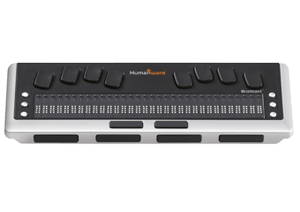
We’re back with One Hardly Used 32 Cell Brailliant New Generation Braille Display at a tremendous savings! In fact, this unit is only 5 months old and has been used for less than 10 hours! This practically new, New Generation of Brailliant Refreshable Braille displays gives you desktop USB/Bluetooth access in a form factor conducive to use with your favorite portable tablet and/or smartphone. 32 Braille Cells give you just enough Braille for desktop use while offering tremendous portability and functionality for the Braille user on the go! Ergonomic thumbkeys together with Braille input keys make entering Braille text and navigating through the most complex Apps a snap for Windows, iOS, and Android users. The Brailliant BI line of displays are Flying Blind, LLC’s preferred and most-used desktop Braille displays in a variety of educational, vocational, and community settings. This unit ships with approximately 1.5 years remaining on its manufacturer’s warranty, is in mint condition, and is listed here at over 25% off of its suggested retail price! Giving you an approximately $650.00 USD savings over a brand new model! Price includes shipping within the 48 Continental United States. This unit will be sold on a first come, first serve basis. To be the first to secure this unit please use the Buy Now link included below. For more information, or to order this product offline, email featured@flying-blind.com or call +1 (216) 381-8107 today!
Buy Now – One Hardly Used Brailliant BI 32 Cell New Generation Refreshable Braille Display for $1,995.00 USD – Flying Blind, LLC Online Store
https://www.paypal.com/cgi-bin/webscr?cmd=_s-xclick&hosted_button_id=MQENFHNH84C98
Greetings,
News
1.) Window-Eyes 9 Beta 1 Available
Window-Eyes 9 Beta 1 is now available for installation on top of a working copy of Version 8, which of course everybody can get for free if you own Microsoft Office. The program has a rewritten, snappier and more powerful web interface, bulit-in QuickBooks support, and more:
http://www.gwmicro.com/Window-Eyes/Beta/
2.) An Introduction to the Consumer Financial Protection Bureau
AFB offers a free webinar, “An Introduction to the Consumer Financial Protection Bureau,” available any time:
http://www.afb.org/store/pages/ShoppingCart/ProductDetails.aspx?ProductId=eIntroCFPB&ruling=Yes
3.) Accessibility Matters at Goldman Sachs
This YouTube video is called “Accessibility Matters: User Experience [UX] Technologies at Goldman Sachs”
https://www.youtube.com/watch?v=ck0Q0tlHgKY
4.) Graphing a Line on the Orion TI-84 Plus
And this YouTube Quick Tip from APH demonstrates Graphing a Line on the Orion TI-84 Plus Talking Graphing Calculator
https://www.youtube.com/watch?v=Q5HhMBhvJNc&feature=youtu.be
5.) Tek Talk Compendium of Networking and Learning Resources
With yours truly (Dean Martineau) as moderator, Tek Talk will offer a Compendium of Networking and Learning Resources for Computer Users with Vision loss, covering some twelve local, national and international resources, some of which I, as Tidbits Editor, hadn’t even run into before. This will air on GMT Tuesday, 2 December at 01:00:
http://conference321.com/masteradmin/room.asp?id=rsc9613dc89eb2
6.) MalwareBytes 2.0 Is More Accessible
We have received reports that version 2.0 of MalwareBytes is now much more accessible to screen reader users:
https://www.malwarebytes.org
7A.) Turning Off Google Instant
If you have experienced Google Instant, the feature of Google that fills in search results as you type and which isn’t terribly friendly to screen readers, and have tried to turn it off without success, you might want to try using these links for Google. In the US, try:
https://www.google.com/webhp?complete=0&hl=en
7B.) And in the UK, use this one
https://www.google.co.uk/webhp?complete=0&hl=en
8.) Blindy.TV South Park Marathon
On Saturday 29 and Sunday 30 November, starting at 20:00 GMT, Blindy.TV will air a marathon of audio-described epidoses of South Park. Each day, they will give away a set of SoundPods Speakers:
http://blindy.tv/node/34
9.) HowToGeek Guide to Black Friday and Cyber Monday Sales
The forces of materialism assert them with great vengeance during this time of year, with many sales, and if you want to find the best ones, “The How-To Geek Guide to Black Friday and Cyber Monday Sales” is at your disposal:
http://www.howtogeek.com/176453/the-how-to-geek-guide-to-black-friday-and-cyber-monday-sales/
10.) Spotlight Text iPad App for Bookshare
Spotlight Text is a $29.95 iPad app well-designed for low-vision users of Bookshare. The app has different reading modes, intended for people with different types of vision loss, as well as an audio-only mode. The linked article gives slightly inaccurate prices for Bookshare:
http://www.blindness.org/blog/index.php/a-new-app-for-book-readers-with-low-vision/
11.) 10 Research Tips for Finding Online Answers
This post from the TED Blog, along with the discussion, is instructive: “10 Tesearch Tips for Finding Online Answers”
http://blog.ted.com/2014/10/02/10-research-tips-for-finding-answers-that-elude-you/
12.) Using iCloud Drive and iCloud Photo Library
From Access News Daily comes “Everything You Need to Know About Using iCloud Drive and iCloud Photo Library”:
http://accessnewsdaily.com/everything-you-need-to-know-about-using-icloud-drive-and-icloud-photo-library/
13.) NVDA 2014.4 Release Candidate
The final upgrade to NVDA for the calendar year, 2014.4, is in the Release Candidate Stage. Learn more about it and get it from here:
http://community.nvda-project.org/blog/NVDA2014.4rc1Released
Turning to a varied collection of audio material this week:
14A.) What’s Coming in NVDA
If you want to hear about what’s coming in NVDA 1014.4, you can listen to this:
http://www.nvda-kr.org/en
14B.) How to Use Google Maps with BlindSquare
Would you like to use BlindSquare with Google Maps but don’t know how? This podcast will help you get started:
https://audioboom.com/boos/2672672-how-to-use-google-maps-with-blindsquare
14C.) The Accessible Devices Podcast Is Back
The Accessible Devices podcast is back after a leave of absence, talking about widgets and more:
http://www.accessible-devices.com/feed.xml
14D.) Eyes on Success discusses Tablet Comparisons for Low Vision Users
14E.) Jonathan Mosen is the guest on the Delivering Access Podcast
http://www.fedoraoutlier.com/dap-season-2-jonathan-mosen/
14F.) Here is an Audio Comparison: Siri Versus Google Voice Search
https://audioboom.com/boos/2684908-audio-comparison-siri-versus-google-voice-search
And finally, AppleVis offers us:
14G.) Beats Studio Wireless Over-Ear Headphones: Unboxing And Description
14H.) Say Play for iOS
Say Play For iOS: Say The Title Of Any Song And Hear It Playing A Few Seconds Later:
http://www.applevis.com/podcast/episodes/say-play-ios-say-title-any-song-and-hear-it-playing-few-seconds-later
14I.) Exploring The Accessibility Of The Apple TV
http://www.applevis.com/podcast/episodes/exploring-accessibility-apple-tv
14J.) The Speak Screen Feature in iOS 8
New In iOS 8: The Speak Screen Feature Adds Something Extra For Low Vision Users:
http://www.applevis.com/podcast/episodes/new-ios-8-speak-screen-feature-adds-something-extra-low-vision-users
Subscription Information
SUBSCRIBE
Do you, a friend, or colleague wish to receive Flying Blind, LLC Publications? If so, please use or pass along our CAPTCHA-free sign-up link, which is: https://toptechtidbits.com/subscribe. You can also subscribe to Flying Blind, LLC Publications on the Flying Blind, LLC Website at: http://www.flying-blind.com. Either of these methods will provide you with an accessibly friendly and secure medium through which you can subscribe to our mailing list. Just enter your name and email address, click send, and begin receiving Flying Blind, LLC Publications. It’s that easy.
Are you on Facebook? Stop by and “Like” Flying Blind, LLC to begin receiving Flying Blind, LLC Publications as part of your Facebook News Feed: http://www.facebook.com/flyingblindllc.
YOUTUBE
If audio / video is more your style, then you can follow Flying Blind, LLC on YouTube at: http://www.youtube.com/flyingblindllc.
RSS FEED
If you prefer an RSS Feed, you can access Flying Blind, LLC Publications as they become available using: https://www.toptechtidbits.com/rss.xml.
ONLINE STORE
Shopping for accessible technology? Check out the Flying Blind, LLC Online Store at: https://www.toptechtidbits.com/store.html. All products offered in the Flying Blind, LLC Online Store are products that Larry L. Lewis, Jr. either personally uses, or publicly endorses. Flying Blind, LLC is proud to offer free shipping & handling on all orders over $100.00 USD within the 48 continental United States.
QUESTIONS
Tidbits are intentionally concise. As a result we know that some readers may not always understand all of the items listed because little explanation is given. If a particular Tidbit brings up a question in your mind, feel free to ask, and we will try to answer as time and knowledge permit.
ARCHIVE
Visit the 2014 Tidbits Archive at: https://www.toptechtidbits.com/tidbits2014.html where you can grab back issues.
CONTENT
Any information for future issues of Top Tech Tidbits may be directed to our editor, Dean Martineau, at: dean@topdotenterprises.com.