

The Week’s News in Access Technology
A Flying Blind, LLC Publication
http://www.flying-blind.com/
This Week’s Featured Advertisement
One Gently Used Focus 14 Blue Wireless Braille Display for $895.00 USD – Flying Blind, LLC Online Store
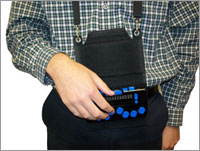
This week we’re pleased to offer one fortunate user One Focus 14 Blue Wireless Braille Display that has hardly ever been used, and is in need of a good home with a versatile, Adaptech Braille user. Shipping in mint condition, and with over four months remaining on its manufacturer warranty, this device is a fantastic companion for the iPhone, iPad, or PC user wishing to have a portable, powerful Braille companion that connects seamlessly to Bluetooth or USB devices. It’s a great, low-cost option for PC users using JAWS, and an equally powerful wireless alternative for the smartphone user on the go! Price includes shipping within the Continental United States, providing a savings of approximately $450.00 USD off of its retail price. This is a single unit that will be sold on a first come, first serve basis. To be the first to secure this unit please use the Buy Now link included below. For more information, or to order this product offline, email featured@flying-blind.com or call +1 (216) 381-8107 today.
Buy Now – One Gently Used Focus 14 Blue Wireless Braille Display for $895.00 USD – Flying Blind, LLC Online Store
https://www.paypal.com/cgi-bin/webscr?cmd=_s-xclick&hosted_button_id=2942H9EH65VU4
Greetings,
News
1.) Braille on Display by Jackie Brown
A useful new book comes from Jackie Brown of the British Computer Association of the Blind. Braille on display tells you about the features found in most of today’s popular Braille devices, and offers the author’s opinion on their pros and cons. It is available for $35 in various electronic formats:
http://mosen.org/brailleondisplay/
2.) Microsoft CaptionBot
Microsoft is taking automatic picture recognition a step further in an online demo which recognizes and describes images. It’s called CaptionBot:
http://blindbargains.com/bargains.php?m=16240
3.) CAVI Music Composition with Reaper Course
CAVI will offer a “Music Composition with Reaper” course next semester. The course costs $150 for those paying out of pocket. A knowledge of tracks, items, folders, effects and the ability to successfully save and render a project in reaper are prerequisites:
http://wiki.cucat.org/pmwiki.php/Main/MusicCompositionWithReaper
4A.) You can read here about Microsoft’s accessibility plans for Office 365
https://blogs.office.com/2016/12/02/accessibility-in-office-365-enabling-greater-digital-inclusion/
4B.) What to Expect in 2017 from Microsoft
And here, for a post saying some of the same things, but detailing planned improvements to Narrator and Windows 10:
https://blogs.msdn.microsoft.com/accessibility/2016/12/02/making-microsoft-products-more-accessible-what-to-expect-in-2017/
5A.) Identifi Object Recognition
Identifi is another object-recognition app (iOS only at present) to add to our portfolio. Amazing what we can do today that we couldn’t even three years ago!
http://www.fredshead.info/2016/12/identifi-object-recognition-for.html
5B.) Envision’s ELI App for Recorded Labels
Meanwhile, Envision has released ELI, an iOS app apparently destined to emulate the capabilities of the Pen Friend. The user purchases special labels from the company, then records or re-records messages of any length to identify the object:
http://www.applevis.com/forum/ios-ios-app-discussion/introducing-envision-eli-personal-assistant-visually-impaired-help
6A.) This article is called “Amazon Echo As An Accessibility Support:”
https://luisperezonline.com/2016/12/05/amazon-echo-as-an-accessibility-support/
6B.) The Echo and Google Home on Tek Talk
Speaking of the Echo, you’ll be able to hear it compared and contrasted with Google Home on Tek Talk for GMT 13 Dec at the special time of 00:30
http://conference321.com/masteradmin/room.asp?id=rsc9613dc89eb2
7.) LibreOffice Accessibility
This page details the current state of accessibility of LibreOffice, one of the free Office alternatives:
http://www.libreoffice.org/get-help/accessibility/
8.) Gift Ideas for People Who Are Blind
As they have in previous years, AFB offers its “Gift Ideas for Friends and Family Members Who Are Blind or Visually Impaired:”
http://www.afb.org/blog/afb-blog/gift-ideas-for-friends-and-family-members-who-are-blind-or-visually-impaired/12
9.) CNET presents “21 Shortcuts for Safari You Need to Know:”
https://www.cnet.com/how-to/shortcuts-for-safari-you-need-to-know/
10.) Blind Scooter Guy
This talk by “Blind Scooter Guy” tells his story and gives his account of how he uses technology:
https://www.youtube.com/watch?v=ngjgHtV8Ohw&t=95s
11.) This AppleVis guide covers “Sharing Data from a Text Message:”
12.) A Social Network for the Disability Community
This site aims to be a social networking platform to bring the disabled community together:
https://mydisabilitymatters.club/new-site-bring-disability-community-together/
13.) Building Electronics Projects
Hear about “Building Electronics Projects,” from two of the participants in the Blind Arduino Project, in Eyes on Success Episode #1650:
http://www.eyesonsuccess.net/show%20notes/show%20notes%201650.htm
14.) NVDA 2016.4 Release Candidate
I’m sure that within the next couple of days the official version will be released, but for now, the release candidate of NVDA 2016.4 is ready. It features improved performance with the Microsoft Edge browser and the implementation of Browse Mode in Windows 10 Mail, among other enhancements:
http://www.nvaccess.org/post/nvda-2016-4rc1-released/
15A.) Other podcasts include the AT Junkies talking about access to Google products
https://audioboom.com/boos/5366828
15B.) Blind Bargains Qast #84
http://blindbargains.com/b/16238
15C.) And the Blind Sight podcast, Episode #17
https://soundcloud.com/theblindsidepodcast/episode17
16.) iAccessibility announces a product to make Spotify for the Mac accessible
http://iaccessibility.net/index.php/downloads/accessible-spotify/
Flying Blind, LLC Classified Ads
1.) One MagniLink S Premium Video Magnification System for $1,995.00 USD – Flying Blind, LLC Online Store
Price: $1,995.00 USD
Savings: Offered here at approximately $2,000.00 USD off its suggested list price.
Contact: http://bit.ly/2beNzxK.
Description: The MagniLink S Premium with Full HD (1080p) offers exceptional image quality. With Full HD, even more detail can be viewed in texts and images, giving the sharpest possible image in both …
2.) One Gently Used Optelec Clearview Plus 22 Inch Monitor with Ultra Flex Arm for $1,995.00 USD – Flying Blind, LLC Online Store
Price: $1,995.00 USD
Savings: Offered here at approximately $1,300.00 USD off its suggested list price.
Contact: http://bit.ly/29Qym36.
Description: Optelec’s Clearview line of video magnifiers is Flying Blind, LLC’s preferred desktop solution for the low-vision user seeking comfort, simplicity, ergonomics, and versatility …
Flying Blind, LLC Online Store Highlights
1.) Welcome to OWAC! Operating Within A Cloud! ‘OWAC: Where The Sky’s The Limit!’ – Flying Blind, LLC Online Store
OWAC Onsite = $1,000.00 USD + Pre-approved travel expenses. OWAC Remote = $500.00 USD
http://bit.ly/OWAC-HTML
The OWAC Professional Development Workshop marries decades of assistive technology know-how with the fast-paced expectations of a predominantly sighted world. Are you serving students …
2.) ‘iOS in the Classroom: A Guide for Teaching Students with Visual Impairments, iOS 9 Edition’ Authored By Larry L. Lewis, Jr., President, Flying Blind LLC, and Published by AFB Press – AFB Online Store
Paperback: $29.95, Online: $17.95, ePUB: $20.95, Kindle: $20.95
http://bit.ly/iOS9-ITC-AFB-FBLLC
This book represents a ‘must have’ for any direct service provider working with vision impaired consumers who are using iOS technology within their educational or pre-vocational settings …
3.) Silver Indoor Outdoor Talking Thermometer for $16.95 USD – Flying Blind, LLC Online Store
http://bit.ly/1HHaM7I
Indoor and outdoor temperature spoken at the touch of a button, Fahrenheit or Celsius, volume control and on/off switch. LCD visual display can show either indoor or outdoor temperature …
4.) Perkins Mini Braille Display 16 Cell for $1,495.00 USD Each and 24 Cell for $2,295.00 USD Each – Flying Blind, LLC Online Store
http://bit.ly/1l9TSEw
A portable Braille display with more to offer for less money. The Mini provides Braille input and output for PCs, tablets, mobile phones, and gives you that internal notetaking functionality …
5.) Large Print Address Book for $16.00 USD – Flying Blind, LLC Online Store
http://bit.ly/1Q1LZxC
Spiral bound book. Holds up to 500 address listings. Three address listings per page. Includes 20/20 pen. Durable covers with inside front and back pockets. Alphabetical tabs and ample room …
6.) Smart Beetle 14 Cell Refreshable Braille Display with Executive Products Carrying Case for $1,275.00 USD – Flying Blind, LLC Online Store
http://bit.ly/1OHltXe
A Pocket-sized Power Pack That Fits Your Lifestyle and Your Budget! Ultra-Portable 14-Cell Braille Display with 5 Simultaneous Bluetooth Connections! Smart Beetle is a 14 Cell Braille …
7.) Large Print Check Register for $8.75 USD – Flying Blind, LLC Online Store
http://bit.ly/1TmcA6r
Spiral bound register helps keep better control of check recording. Contains spaces for 14 entries per full page. Size: 5″ x 9″ …
8.) Braille Edge 40 Braille Display with Executive Products Carrying Case for $2,795.00 USD – Flying Blind, LLC Online Store
http://bit.ly/1O5ircy
The most powerful and versatile Braille display, with the features of a basic Notetaker! Manage Your Daily Life! Braille EDGE 40 is not only a most reliable, high-performance refreshable Braille …
Flying Blind, LLC Subscription Information
SUBSCRIBE
Do you, a friend, or colleague wish to receive Flying Blind, LLC Publications? If so, please use or pass along our CAPTCHA-free sign-up link, which is: https://toptechtidbits.com/subscribe. You can also subscribe to Flying Blind, LLC Publications on the Flying Blind, LLC Website at: http://www.flying-blind.com. Either of these methods will provide you with an accessibly friendly and secure medium through which you can subscribe to our mailing list. Just enter your name and email address, click send, and begin receiving Flying Blind, LLC Publications. It’s that easy.
WEBSITE
Visit Flying Blind, LLC online at http://www.flying-blind.com.
Are you on Facebook? Stop by and “Like” Flying Blind, LLC to begin receiving Flying Blind, LLC Publications as part of your Facebook News Feed: http://www.facebook.com/flyingblindllc.
YOUTUBE
If audio / video is more your style, you can follow Flying Blind, LLC on YouTube at: http://www.youtube.com/flyingblindllc.
RSS FEED
If you prefer an RSS Feed, you can access Flying Blind, LLC Publications as they become available using: https://www.toptechtidbits.com/rss.xml.
ONLINE STORE
Shopping for accessible technology? Check out the Flying Blind, LLC Online Store at: https://www.toptechtidbits.com/store.html. All products offered in the Flying Blind, LLC Online Store are products that Larry L. Lewis, Jr. either personally uses, or publicly endorses. Flying Blind, LLC is proud to offer free Shipping & Handling on all orders over $100.00 USD within the 48 continental United States.
QUESTIONS
Tidbits are intentionally concise. As a result we know that some readers may not always understand all of the items listed because little explanation is given. If a particular Tidbit brings up a question in your mind, feel free to ask, and we will try to answer as time and knowledge permit.
ARCHIVE
Visit the 2016 Tidbits Archive at: https://www.toptechtidbits.com/tidbits2016.html where you can grab back issues.
CONTENT CONTRIBUTORS
Any information for future issues of Top Tech Tidbits may be directed to our editor, Dean Martineau, at: editors@toptechtidbits.com.