

The Week’s News in Access Technology
Distributed by Flying Blind, LLC
http://www.flying-blind.com/
This Issue’s Featured Advertisement
E-Blink Showcase Presents BrailleNote PKs!
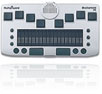 Due to a larger than usual number of requests, Flying Blind, LLC has located a couple more refurbished, as well as a couple of brand new, BrailleNote PKs, the world’s smallest notetaker with a Braille Display. Refurbished units cost US$2,000.00 and the brand new units cost US$4,200.00. Prices include shipping & handling within the continental (48 contiguous) United States. Please e-mail e-blink@flying-blind.com or call +1 (216) 381-8107 for additional details. These are single units that will be sold on a first come, first serve basis.
Greetings,
News
1.) Staying Connected: Technology Options for Older Adults
Staying Connected: Technology Options for Older Adults is a pdf brochure that seeks to explain Skype, Facebook, Twitter and other modern technology to the senior population.
http://www.eldercare.gov/eldercare.net/Public/Resources/Brochures/docs/N4A_Tech_Brochure_P06_high.pdf
2.) December 2010 AccessWorld on Independent Travel
In the December, 2010 issue of AccessWorld, the focus is independent travel, with various reviews for GPS programs, We also learn about the Olympus DM-r recorder and about Microsoft’s admitted failure to provide any hint of accessibility to Windows Phone 7.
http://www.afb.org/accessworld
3.) NFB Newsline Job Search
NFB Newsline has added a job search feature, only accessible by phone, which lets users search a nationwide job classified database.
http://www.nfbnewsline.org
4.) Four New Services from NFB Newsline
In Serotalk Tech Chat 81: Scott White and Stephen Tompkins Share 4 New Services from NFB Newsline, including the job search function.
http://www.serotalk.com/2010/12/10/tech-chat-81-scott-white-and-stephen-tompkins-share-4-new-services-from-nfb-newsline/
5.) Creating a Windows 7 Repair Disk
This Gizmo article is entitled How to Prepare for Boot or System Problems by Creating a Windows 7 Repair Disk
http://feedproxy.google.com/~r/gizmosbest/~3/W49ACJJCij8/how-prepare-boot-or-system-problems-creating-windows-7-repair-disk.htm
6.) GW Micro Custom Scripting
Gw Micro has begun offering custom scripting, so individuals or companies can get their programs customized to best work with Window-Eyes.
http://www.gwmicro.com/Custom_Scripting/
7.) J-Tunes Version 5
Version 5 of J-Tunes, the package that helps JAWS version 11 or 12 users get the most out of iTunes, has been released.
http://www.tandt-consultancy.com/pages/j-tunes.php
8.) Half-Price All inPlay Memberships
Memberships to All inPlay are available for slightly more than half price until December 31.
http://allinplay.com/participate/gift_membership.php
9.) More App Reviews on AppleVis
Apps recently reviewed on the AppleVis site for users of iPhone, iPad and iPod include GoReader (RSS Reader with Google Reader™ full support), RF, weather alert usa, Slide Reader Broadsheet Edition, Accessible Minesweeper, Notesy for Dropbox, Da Vinci Sleep Clock, HowStuffWorks, Air Alarm, Movies Trivia, Warranty Checker, Tooth Camp, Decades Internet Radio US, X3 World Radio, Amazon Mobile UK, PC Monitor, Find My iPhone, and Talkatone – the social phone and IM for GTalk (gmail chat) and VoIP Google Voice
http://applevis.com/
10.) EASI Free Webinars in January
Free EASI webinars in January include Sing Along with Microsoft OneNote – An Accessible Digital Notebook! Jan. 10 a two-part webinar on Flash: Part 1: Flash: what is it, Jan. 11, Part 2 Flash: Making it Accessible, Jan. 18, a two-part webinar on Android accessibility: Part 1 Update on the evolution of Android Smart Devices and Accessibility, January 20, Part 2: Overview of Two, Major, Android Projects Focused on the accessibility of “Near Field Communications (NFC)-Enabled Android Smart Device” NFC Control, January 27. All sessions start at 19:00 GMT. Fee-based webinars on PDF accessibility are also available.
http://easi.cc/clinic.htm
11.) Carroll Center Course on Choosing an Accessible Cell Phone
The Carroll Center offers a new $100 course entitled Choosing an Accessible Cell Phone. Account creation or logon is required to see the information.
http://go.madmimi.com/redirects/ead08747f53d1c78d16be1fdea68ea78?pa=2408159656
12.) AccessWatch Review of Klango 3.5.1
An accessibility review of Klango version 3.5.1 has been added to the AccessWatch database.
http://www.accesswatch.info
13.) Updated Window-Eyes Scripts for Word and TeamTalk
Updates to the Window-Eyes script for Microsoft Word, allowing reading of footnotes and endnotes, and the script for TeamTalk, are not posted.
http://www.gwmicro.com/sc
14.) Vinux 3.1 Based on Ubuntu
Vinux 3.1, an accessible Linux distribution based on Ubuntu 10.1, is now available.
http://vinux.org.uk/downloads.html
15.) PDF Accessibility Findings from Australia
The government of Australia has found problems with pdf accessibility. Here is a text version of their findings:
http://www.guidedogswa.org/library/openbiblio/shared/biblio_view.php?bibid=107687&tab=opac
16.) Cases for the Braille Connect Displays
Executive Products has designing a case for the Braille Connect 32 and 40 displays.
http://www.executiveproductsinc.com
Subscription Information
For questions and comments regarding Tidbits, please e-mail Dean Martineau at dean@topdotenterprises.com. Dean Martineau provides adaptive technology training by phone, online, and in person, with flexible arrangements, and at affordable prices.
Would you like to receive text-only versions of the Top Tech Tidbits and Adaptech Insider Newsletters? If so, find the link at the bottom of each Newsletter titled “Update Profile/E-Mail Address”, and check this newly-available option.
Feel free to forward individual Tidbits, or the entire tidbits issue, to interested people (but make sure they don’t already receive it; a lot do!) When doing this, please have the courtesy to cite your source, perhaps directing them to the Tidbits archive (see below.)
Tidbits is intentionally concise, and we know a lot of people may not understand some items because little explanation is given. If a particular Tidbit brings up a question in your mind, feel free to ask, and I will try to answer as time and knowledge permit.
Visit the Tidbits archive at https://www.toptechtidbits.com/tidbits2010.html where you can grab back issues. All that welcome information for future issues can come to me at dean@topdotenterprises.com.
You can subscribe to Top Tech Tidbits on the Flying Blind, LLC Website at: http://www.flying-blind.com. Here you will find an accessibly friendly and secure form into which you can enter your email address, click submit, and begin receiving Tidbits weekly. It’s that easy.
| Flying Blind, LLC | 955 Pembrook Road | Cleveland Heights, Ohio 44121 |