

The Week’s News in Access Technology
A Flying Blind, LLC Publication
http://www.flying-blind.com/
This Week’s Featured Advertisement
One Gently Used Optelec Clearreader Plus for $1,195.00 USD
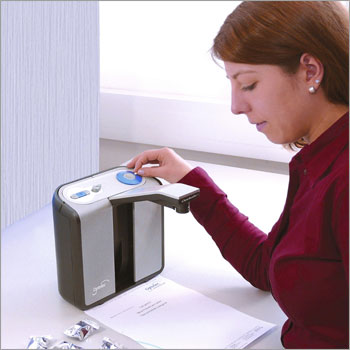
This week we’re pleased to offer you Flying Blind, LLC’s preferred standalone scan-and-read system manufactured by Optelec, the Clearreader Plus. This sleek, compact solution touts power, speed, and responsiveness in a portable design for the user wishing to read hardcopy print both effortlessly and efficiently. Crisp, responsive speech coupled with a simplistic command structure in an affordable package which runs off of a rechargeable battery makes this a “must have” for the user with functional vision wishing to listen to text read aloud as well as the individual with no remaining vision wishing to capture the freedom and exhilaration of reading a variety of hardcopy materials without being tethered to a computer! This unit is priced approximately 50% off of its suggested retail price, thousands of dollars lower than other less competitive options, and still under the manufacturer’s warranty! This is a single unit that will be sold on a first come, first serve basis. Price includes shipping within the Continental United States. To be the first to secure this unit please use the Buy Now link included below. For more information or to order this product offline, email featured@flying-blind.com or call +1 (216) 381-8107 today!
Buy Now – One Gently Used Optelec Clearreader Plus for $1,195.00 USD – Flying Blind, LLC Online Store
https://www.paypal.com/cgi-bin/webscr?cmd=_s-xclick&hosted_button_id=DSV9KYG8V5PLG
Greetings,
News
1.) May 2014 AccessWorld Reviews the BrailleSense U2 Mini
The May, 2014 issue of AccessWorld includes articles on the HIMS BrailleSense U2 Mini, iOS apps for keeping up with news, Accessible QuickBooks, accessibility of Office for iPad, the iOS app My Fitness Tool, and eSight Eyewear and Smart Glasses from Assisted Vision:
http://www.afb.org/aw/main.asp
2.) Broadcast It: StationPlaylist Studio and JAWS Tutorial
The latest production from Mosen Consulting, for the aspiring broadcaster, is “Broadcast It” the Definitive Guide to StationPlaylist Studio and JAWS for Windows, a 13-hour tutorial available in MP3, DAISY, or both, for prices beginning at $60.00:
http://mosen.org/index.php/broadcast-it-the-definitive-guide-to-stationplaylist-studio-and-jaws-for-windows/
3.) Read one user’s thoughts on the new RNIB Navigator app
http://www.hartgen.org/node/226
4A.) Hadley Seminar on Advanced VoiceOver Gestures
Join Seminars@Hadley on Wednesday, May 21, 2014, 18:00 GMT for tips and training on: Using advanced Voiceover gestures, Using the notes app, Typing on your iDevice, and how to select, copy and paste text. To register for the seminar, visit:
http://hadley.edu/Seminar_register.asp?sid=231
4B.) Hadley Instructional Videos on YouTube
Find an instructional video on each of the seminar topics posted on Hadley’s YouTube Channel at:
http://www.youtube.com/hadleyschool
5.) GW Micro Webinar on Word 2013 and Window-Eyes
GW Micro offers a Free Online Training Webinar – Working with Word 2013 and Window-Eyes: Part 2, on Friday, 16 May at 18:00 GMT. To participate, sign in here with your first and last name as your username and leaving the password field blank:
http://www.gwmicro.com/meeting
6.) Main Menu Interview on GW Micro and AI Squared
The 9 May edition of Main Menu contained an interview about GW Micro and their merger with AI Squared. That recording, along with the rest of the program and older editions of Main Menu, can be found here:
http://mainmenu.acbradio.org/shows.php
7.) CAVI’s Short Course on NVDA
CAVI’s proposed short course on NVDA that we mentioned last week is a go. The first lecture will be on GMT Saturday, 21 June at 01:00. Registration by 14 June is required:
http://wiki.cucat.org/index.php?n=Main.NVDA
8.) Custom Vibration Alerts on Your iPhone
iMore brings us the article “How to create and customize vibration alerts on your iPhone”:
http://www.imore.com/how-set-custom-alert-vibrations-or-disable-them-your-iphone-and-ipad?utm_source=dlvr.it&utm_medium=twitter
9.) Spring Cleaning iOS
From OS X Daily comes the article “Spring Cleaning iOS: Simple and Essential Maintenance Tips for iPhone & iPad”:
http://osxdaily.com/2014/05/08/essential-ios-maintenance-tips/?utm_content=buffer8a75c&utm_medium=social&utm_source=twitter.com&utm_campaign=buffer
10.) How to Add More Storage to an iOS Device
CNET contributes a guide on “How to add more storage to an iOS device”:
http://www.cnet.com/how-to/how-to-add-more-storage-to-an-ios-device/
11.) Free University Computer Science Courses
From Lifehacker Australia, we learn how to “Get A University Computer Science Education With These Free Courses”:
http://www.lifehacker.com.au/2014/05/get-a-university-computer-science-education-with-these-free-courses/
12.) Learn about recent activity of the Braille Authority for North America
http://www.brailleauthority.org/pressreleases/pr-2014-4.html
Turning to audio for the week:
13A.) New Dog, New Podcasting Equipment and New Headphones
Dr. Carter has posted “New Dog, New Podcasting Equipment and New Bone Conduction Headphones”:
http://www.dr-carter.com
13B.) OurPlace Podcast from Computer Room Services is up to #385
http://comproom.co.uk/ourplace/op385-10-05-14.mp3
13C.) Try your Hand at Being a DJ with Crossfader for iOS
http://applevis.com/podcast/episodes/try-your-hand-being-dj-crossfader-ios
13D.) Trim Audio in the Audioboo iOS App
Quick Tip: How to Use the Trim Audio Feature in the Audioboo iOS App:
http://applevis.com/podcast/episodes/quick-tip-how-use-trim-audio-feature-audioboo-ios-app
13E.) Introducing Perkinput for iOS
Introducing Perkinput for iOS; the Newest Text Entry Alternative to the Keyboard for Braille Users:
http://applevis.com/podcast/episodes/introducing-perkinput-ios-newest-text-entry-alternative-keyboard-braille-users
13F.) Check out Serotalk Podcast 198
http://serotalk.com/2014/05/07/serotalk-podcast-198-guide-cats-for-the-blind/
13G.) The recent CAVICast on Web Standards is now available for download
13H.) The Early History of Screen Readers
Finally, in Eyes on Success 1420, learn about the early history of screen readers and web accessibility:
http://www.eyesonsuccess.net/
Subscription Information
SUBSCRIBE
Do you, a friend, or colleague wish to receive Flying Blind, LLC Publications? If so, please use or pass along our CAPTCHA-free sign-up link, which is: https://toptechtidbits.com/subscribe. You can also subscribe to Flying Blind, LLC Publications on the Flying Blind, LLC Website at: http://www.flying-blind.com. Either of these methods will provide you with an accessibly friendly and secure medium through which you can subscribe to our mailing list. Just enter your name and email address, click send, and begin receiving Flying Blind, LLC Publications. It’s that easy.
Are you on Facebook? Stop by and “Like” Flying Blind, LLC to begin receiving Top Tech Tidbits for Thursday as part of your Facebook News Feed: http://www.facebook.com/flyingblindllc.
YOUTUBE
If audio / video is more your style, then you can follow Flying Blind, LLC on YouTube at: http://www.youtube.com/flyingblindllc.
RSS FEED
If you prefer an RSS Feed, you can access Flying Blind, LLC Publications as they become available using: https://www.toptechtidbits.com/rss.xml.
ONLINE STORE
Shopping for accessible technology? Check out the Flying Blind, LLC Online Store at: https://www.toptechtidbits.com/store.html. All products offered in the Flying Blind, LLC Online Store are products that Larry L. Lewis, Jr. either personally uses, or publicly endorses. Flying Blind, LLC is proud to offer free shipping & handling on all orders over $100.00 USD within the 48 continental United States.
QUESTIONS
Tidbits is intentionally concise, and we know a lot of people may not understand some items because little explanation is given. If a particular Tidbit brings up a question in your mind, feel free to ask, and we will try to answer as time and knowledge permit.
ARCHIVE
Visit the 2014 Tidbits Archive at: https://www.toptechtidbits.com/tidbits2014.html where you can grab back issues.
CONTENT
Any information for future issues of Top Tech Tidbits may be directed to our editor, Dean Martineau, at: dean@topdotenterprises.com.