

The Week’s News in Access Technology
A Flying Blind, LLC Publication
http://www.flying-blind.com/
This Week’s Featured Advertisement
One Gently Used Optelec Clearreader Plus for $1,195.00 USD
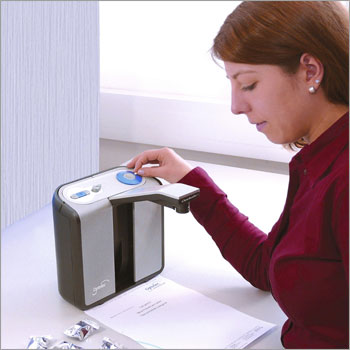
This week we’re pleased to offer you Flying Blind, LLC’s preferred standalone scan-and-read system manufactured by Optelec, the Clearreader Plus. This sleek, compact solution touts power, speed, and responsiveness in a portable design for the user wishing to read hardcopy print both effortlessly and efficiently. Crisp, responsive speech coupled with a simplistic command structure in an affordable package which runs off of a rechargeable battery makes this a “must have” for the user with functional vision wishing to listen to text read aloud as well as the individual with no remaining vision wishing to capture the freedom and exhilaration of reading a variety of hardcopy materials without being tethered to a computer! This unit is priced approximately 50% off of its suggested retail price, thousands of dollars lower than other less competitive options, and still under the manufacturer’s warranty! This is a single unit that will be sold on a first come, first serve basis. Price includes shipping within the Continental United States. To be the first to secure this unit please use the Buy Now link included below. For more information or to order this product offline, email featured@flying-blind.com or call +1 (216) 381-8107 today!
Buy Now – One Gently Used Optelec Clearreader Plus for $1,195.00 USD – Flying Blind, LLC Online Store
https://www.paypal.com/cgi-bin/webscr?cmd=_s-xclick&hosted_button_id=DSV9KYG8V5PLG
Greetings,
News
1.) NVDA Release Candidate for Testing
Following its usual pattern the creators of NVDA are rolling out the next stable release and first allowing it to be publicly tested. 2014.2rc1 has been released for testing:
http://community.nvda-project.org/blog/NVDA2014.2rc1Released
2.) BlindSquare Version 2
The popular iOS navigation app BlindSquare has been upgraded to version 2. The upgrade is free to existing owners, but the app now costs $29. Here’s a blog post about it:
http://www.hartgen.org/blindsquare
3.) Review of the Second Generation Aftershokz Bluez
Also in the area of navigation, though this accessory can be used for more, read an Accessory Review of The Second Generation Aftershokz Bluez:
http://www.applevis.com/reviews/bluetooth-headsets/second-generation-aftershokz-bluez
4.) Lifehacker offers us the “Five Best Book Recommendation Services”
http://lifehacker.com/five-best-book-recommendation-services-1577706074
5.) The 10 Best iPhone Tricks You Didn’t Know Existed
Read MacWorld UK’s article, “The 10 best iPhone tricks you didn’t know existed: iPhone tips, shortcuts and hidden features”:
http://www.macworld.co.uk/feature/iphone/10-best-iphone-tips-tricks-you-didnt-know-existed-3514829/
6.) Aaron Linson sells a Kindle Fire HDX tutorial for around $24
http://blindpodcaster.com/kindle-fire-hdx
7.) Here is “A Review of Chicken Nugget from Accessible Apps”
http://dogriver.dreamwidth.org/366644.html
8.) Word 2013 with Window-Eyes, Second Installment
The second installment of GW Micro’s online training series on using Microsoft Word 2013 with Window-Eyes is now available.
http://www.gwmicro.com/webinars
9.) Dr. Sam Genensky Video Magnifier Memorial Awards
The Council of Citizens with Low Vision International (CCLVI) announces the Dr. Sam Genensky Video Magnifier Memorial Awards. A total of 3 video magnifiers will be awarded to children and adults:
http://www.cclvi.org/scholarships/?q=node/4
10.) Tek Talk on the Broadcast It Tutorial
Learn about the 13-hour tutorial “Broadcast It” on Tek Talk on GMT Tuesday, 27 May at 00:00:
http://conference321.com/masteradmin/room.asp?id=rsc9613dc89eb2
11.) Eight Terminal Utilities Every OS X Command Line User Should Know
Check out the article “Eight Terminal Utilities Every OS X Command Line User Should Know”:
http://www.mitchchn.me/2014/os-x-terminal/
12.) VoiceOver with Braille on Your Apple Device
Thanks to AppleVis, we can read “Getting the most out of your Apple Mobile or Desktop Device using VoiceOver with Braille”:
http://www.applevis.com/guides/braille-ios-ios-apps-mac-apps-mac-os-x-voiceover/getting-most-out-your-apple-mobile-or
13.) Combine Multiple iMessages into a Single Message
Courtesy of TUAW, Here’s “iPhone 101: How to easily combine multiple iMessages into a single message”:
http://www.tuaw.com/2014/05/14/iphone-101-how-to-easily-combine-multiple-imessages-into-a-sing/
14.) Chris Hofstader Remembers GW Micro
Chris Hofstader tends to have interesting viewpoints, with which all do not agree. I suspect this will prove true of this article giving his perspective on screen reader history, remembering GW Micro:
http://chrishofstader.com/remembering-gw-micro/
In a somewhat truncated look at the week’s audio:
15A.) Google Glass and the Blind Market
This podcast on “Google Glass and the Blind Market” comes with a transcript, as do all the podcasts from Vision Australia:
http://www.mediaaccess.org.au/audio-description-on-radio/google-glass-and-the-blind-market
15B.) A Great App for Shopping Lists
The AT Junkie offers “A Great App for Shopping Lists and Blowing a Job Interview”:
http://audioboo.fm/boos/2161543
15C.) David Woodbridge Demo of OS X Maps with VoiceOver
David Woodbridge, the source of much that appears in Tidbits, has recorded a “Demo of using OS X maps with VoiceOver to get route step information from origin to destination location”:
http://davidwoodbr.podbean.com/e/demo-of-using-maps-in-os-x-mavericks-to-get-route-steps-from-origin-to-destination-location/
15D.) The latest Tech Doctor podcast is called Macro Maestro
15E.) Glance and ETI EloQuence for Android
Hear about Glance and ETI EloQuence for Android on “Discuss Android From An Accessible Point of View”:
http://instaca.st/b/i4r
Subscription Information
SUBSCRIBE
Do you, a friend, or colleague wish to receive Flying Blind, LLC Publications? If so, please use or pass along our CAPTCHA-free sign-up link, which is: https://toptechtidbits.com/subscribe. You can also subscribe to Flying Blind, LLC Publications on the Flying Blind, LLC Website at: http://www.flying-blind.com. Either of these methods will provide you with an accessibly friendly and secure medium through which you can subscribe to our mailing list. Just enter your name and email address, click send, and begin receiving Flying Blind, LLC Publications. It’s that easy.
Are you on Facebook? Stop by and “Like” Flying Blind, LLC to begin receiving Top Tech Tidbits for Thursday as part of your Facebook News Feed: http://www.facebook.com/flyingblindllc.
YOUTUBE
If audio / video is more your style, then you can follow Flying Blind, LLC on YouTube at: http://www.youtube.com/flyingblindllc.
RSS FEED
If you prefer an RSS Feed, you can access Flying Blind, LLC Publications as they become available using: https://www.toptechtidbits.com/rss.xml.
ONLINE STORE
Shopping for accessible technology? Check out the Flying Blind, LLC Online Store at: https://www.toptechtidbits.com/store.html. All products offered in the Flying Blind, LLC Online Store are products that Larry L. Lewis, Jr. either personally uses, or publicly endorses. Flying Blind, LLC is proud to offer free shipping & handling on all orders over $100.00 USD within the 48 continental United States.
QUESTIONS
Tidbits is intentionally concise, and we know a lot of people may not understand some items because little explanation is given. If a particular Tidbit brings up a question in your mind, feel free to ask, and we will try to answer as time and knowledge permit.
ARCHIVE
Visit the 2014 Tidbits Archive at: https://www.toptechtidbits.com/tidbits2014.html where you can grab back issues.
CONTENT
Any information for future issues of Top Tech Tidbits may be directed to our editor, Dean Martineau, at: dean@topdotenterprises.com.